> ## Documentation Index
> Fetch the complete documentation index at: https://support.bolt.new/llms.txt
> Use this file to discover all available pages before exploring further.
# Bolt Forge: build with open-source AI models in Bolt
> Bolt Forge gives you more usage through open-source AI models. Learn how to get Forge on the Pro or Lite plan, switch models, check your usage, and understand how your data is handled.
Forge is a third agent in Bolt, alongside Standard and Max, built entirely on open-source AI models. Because these models cost less to run than the proprietary models behind Standard and Max, Forge includes more usage than Bolt's other agents. Standard and Max are still Bolt's most capable agents.
## What is Bolt Forge?
Forge is an [agent](/building/using-bolt/agents), similar to Bolt's existing Standard and Max agents. When using Forge, you can select from leading open-source AI models, including:
* GLM 5.3
* GLM 5.3 Flash
* Kimi K3
* DeepSeek v4 Pro
Kimi K3 and DeepSeek v4 Pro use your Forge usage faster than GLM 5.3 and GLM 5.3 Flash.
If you're not sure which model to use, we recommend GLM 5.3 Flash. It's fast, smart, and token-efficient, so it's a good choice for most tasks. Usage estimates for Forge are based on this model, so your usage adds up faster if you build with a different one.
New open-source models are added to Forge as they become available.
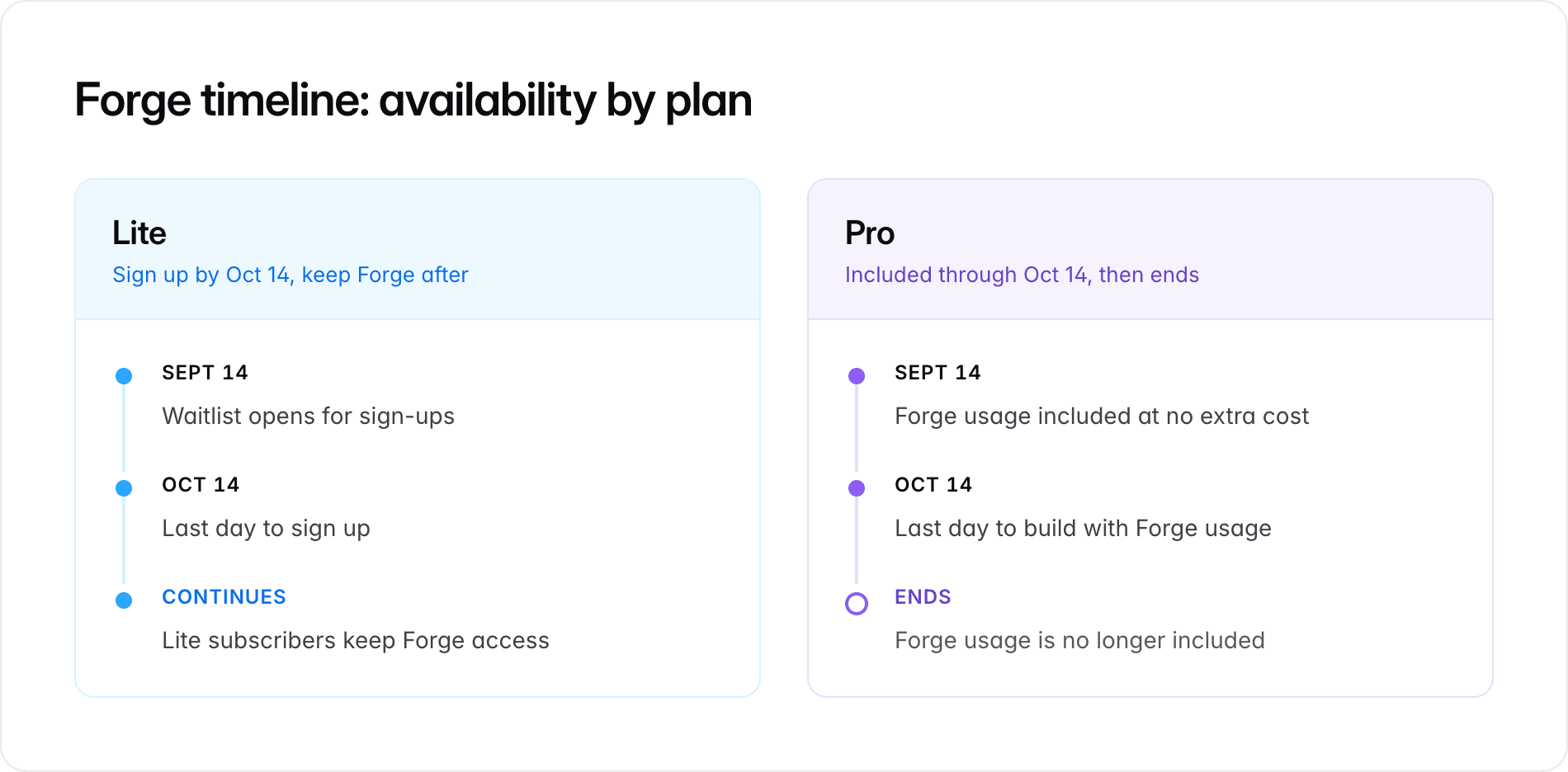
Forge is currently a research preview, which is an experimental version of a feature that Bolt is still testing and developing. The preview runs from September 14 to October 14, 2026.
 For the full story on Forge and the open-source models behind it, see [What is Bolt Forge?](https://bolt.new/blog/what-is-bolt-forge) on the Bolt blog.
## Get Bolt Forge
You can get access to Forge in two ways:
* It's [included free](#get-forge-automatically-as-part-of-your-pro-plan) with every individual Pro plan.
* You can [join the waitlist](#join-the-waitlist-to-get-access-through-bolt-lite) to get access through Bolt Lite, a new standalone plan that costs \$9 a month.
Forge isn't available on Teams or Enterprise plans.
### Get Forge automatically as part of your Pro plan
If you're on an individual Pro plan, or if you sign up for one during the Forge preview, Bolt Forge is included at no additional cost until the preview ends.
To start using Forge, select **Bolt Forge** in the agent picker and accept the terms before sending a prompt. To learn how to switch agents, see [Choose an agent](/building/using-bolt/agents).
### Join the waitlist to get access through Bolt Lite
New users and existing Free plan users can get Bolt Forge through Lite, a standalone plan that costs \$9 a month.
To get Lite, join the waitlist, then subscribe when your seat is ready:
1. Sign up for the [Bolt Lite waitlist](https://bolt.new/lite).
You'll get an email that you're on the list.
2. When your seat is ready, Bolt emails you an access code.
Claim your seat within 72 hours of receiving your access code. If you don't claim it in time, the seat goes to the next person on the waitlist.
3. Click the link in your email and make sure you're signed in to Bolt.
4. When prompted, enter your access code to claim your seat.
5. Subscribe to Lite, then [switch to a Forge model](#switch-to-a-forge-model).
Like other Bolt subscriptions, Lite renews automatically each month until you cancel it.
## What's included with Lite
Lite gives you the core Bolt experience: you can [build websites, web apps, and mobile apps](/get-started/intro-bolt) with AI, store data using Bolt's [built-in database](/cloud/database), [invite other users to collaborate](/building/using-bolt/sharing) on your project, and [publish](/cloud/hosting/publish) what you build to a `bolt.host` URL.
Lite doesn't include the following features:
* Building with the [Standard and Max agents](/building/using-bolt/agents). Lite only gives you access to Forge.
* [Generating AI images](/building/images#generate-ai-images).
* Running a [security scan](/building/security) of your project.
* Managing your database connection through [Supabase](/integrations/supabase). Lite only supports Bolt's built-in database.
* Connecting a [custom domain](/cloud/domains/connect).
* Buying extra usage if you run out early.
* Removing the **Made in Bolt** badge from your site.
To get these features, [upgrade from Lite to Pro](#upgrade-from-lite-to-pro).
### Free, Lite, and Pro compared
The following table compares the features included in the Free, Lite, and Pro plans.
| Feature | Free | Lite | Pro |
| ------------------------------------ | ------------------------- | --------------------------- | -------------------------------------------------------------------------------------- |
| AI agents | Standard only | Forge only | Standard, Max, and Forge |
| Usage allowance | Free-tier allowance | Forge allowance | Usage that scales with your plan tier, plus the same Forge allowance on every Pro plan |
| Buy extra usage | No | No | Yes, on [the highest tiers](/account-and-subscription/tokens#buy-more-tokens) |
| AI image generation | No | No | Yes |
| Security scan | No | No | Yes |
| Database | Bolt database | Bolt database | Bolt database or Supabase |
| Custom domains | No | No | Yes |
| Attachments per message | 5 files, up to 10 MB each | 20 files, up to 100 MB each | 20 files, up to 100 MB each |
| Maximum prompt size | Base limit | Double the base limit | Double the base limit |
| Paid referral rewards | No | Yes | Yes |
| **Made in Bolt** badge shows on site | Yes | Yes | No |
## Switch to a Forge model
Forge appears as an option in the agent picker. You can [choose an agent](/building/using-bolt/agents) from the chatbox, either on the home page or within a project.
Forge's open-source models are experimental and can be less reliable than Standard or Max.
If your project is important, we recommend you [duplicate it](/building/using-bolt/projects-files#duplicate-a-project) before editing it using Forge, so you have something to go back to if needed.
For Pro users, we also recommend using Standard or Max for complex work.
To switch to a Forge model and send a prompt:
1. In the agent picker, click **Bolt Forge**, then click the model you want to use.
2. Enter and send your prompt.
The first time you send a prompt using Forge, you'll need to read and agree to the terms.
Because using Forge shares your data to help train open-source models, you must agree to this before sending any prompts. To learn more, see [Data privacy with Forge models](#data-privacy-with-forge-models).
If you're on a Pro plan and want to stop using Forge, switch back to Standard or Max in the agent picker. If you're on Lite, Forge is the only agent you can use.
## Track your Forge usage
Your Forge usage shows as a percentage bar on the Subscription & Tokens page in your settings. Your usage allocation resets to 100% once a month, on your Forge renewal date (the day of the month you signed up for Forge).
There's no daily limit to your Forge usage.
If you're on a Pro plan:
* Every individual Pro plan gets the same Forge allowance, regardless of which Pro tier you're on.
* Bolt Forge usage is separate from your Standard and Max usage. Building with Forge doesn't affect your regular usage, and building with Standard or Max doesn't affect your Forge usage.
To check your remaining Forge usage:
1. Log in to Bolt.
2. On the Bolt homepage, in the sidebar, click your profile icon in the bottom-left, then click **Subscription**.
3. On the Subscription & Tokens page, view your Forge usage bar.
### What happens when your Forge usage runs out
If you're on a Pro plan and use all your Forge usage for the month, Bolt switches you to the Standard agent. You can continue building with Standard or Max.
If you're on Lite, Forge is the only agent included. If you use all your Forge usage, you won't be able to send new messages until your usage resets or you upgrade to a Pro plan.
## Data privacy with Forge models
When you use Bolt Forge, your prompts, code, and any fix traces Bolt creates are anonymized, then stored and used by Bolt's partners to train open-source AI models. The first time you switch to Forge, you have to agree to this.
If you stop using Forge, data that was already used for training isn't removed. Switching to a different agent only stops new data from being shared going forward.
To learn about the thinking behind Bolt Forge, and Bolt's partnership with Arcee AI to improve open-source models, see [What is Bolt Forge?](https://bolt.new/blog/what-is-bolt-forge) on the Bolt blog.
## Upgrade from Lite to Pro
When you upgrade from Lite to any Pro plan, your Forge usage resets to 100% right away. You can build with that Forge usage through the end of the day on October 14, when Forge access ends on Pro plans.
For the general steps to upgrade your plan, see [Upgrade your paid plan to a higher paid plan](/account-and-subscription/billing#upgrade-your-paid-plan-to-a-higher-paid-plan).
You can't downgrade a Pro plan to Lite. If you downgrade or cancel your Pro plan, you'll move to the Free plan and lose access to Forge. You'll need to [join the waitlist](#join-the-waitlist-to-get-access-through-bolt-lite) to get access to Forge again.
## FAQ
You can upload images and other file types when using Forge. However, Forge doesn't support PDF uploads yet.
Forge doesn't include the option to buy additional usage. If you're on Lite, your usage allocation resets to 100% once a month, on your Forge renewal date (the day of the month you signed up for Forge).
Since Forge is included with Pro, Lite users can [upgrade to Pro](#upgrade-from-lite-to-pro) to get their Forge usage reset immediately.
If you're on Pro and run out of usage, continue building with Standard or Max.
It depends on your plan.
If you're on Lite, October 14 is the last day to sign up. If you're already subscribed by then, you keep your plan at \$9 a month and keep building with Forge. You won't be switched to a different plan or charged a different price.
If you're on a Pro plan, your Forge access and additional free usage end on October 14. Your Pro plan and your Standard and Max usage aren't affected, so you can keep building with those agents.
You still get a normal monthly subscription and a full month of Forge usage, not just the few days remaining in the preview.
Your subscription keeps renewing after the preview's end date, the same as if you'd signed up at any other time.
If you cancel, you keep access through the rest of your paid billing period, the same as any other Bolt plan.
Bolt Forge isn't available on Teams or Enterprise plans. If you're on an individual plan and Forge is locked in the agent picker, you may not have a Pro plan, or you haven't yet claimed your Lite seat from the waitlist.
You can cancel Lite the same way you'd cancel any paid Bolt plan. To learn more, see [Cancel a subscription](/account-and-subscription/billing#cancel-a-subscription).
Bolt subscriptions, including Lite, are non-refundable, as stated in our Terms of Service. If you have questions about your subscription, reach out to [support@bolt.new](mailto:support@bolt.new) using the email address associated with your paid account.
For the full story on Forge and the open-source models behind it, see [What is Bolt Forge?](https://bolt.new/blog/what-is-bolt-forge) on the Bolt blog.
## Get Bolt Forge
You can get access to Forge in two ways:
* It's [included free](#get-forge-automatically-as-part-of-your-pro-plan) with every individual Pro plan.
* You can [join the waitlist](#join-the-waitlist-to-get-access-through-bolt-lite) to get access through Bolt Lite, a new standalone plan that costs \$9 a month.
Forge isn't available on Teams or Enterprise plans.
### Get Forge automatically as part of your Pro plan
If you're on an individual Pro plan, or if you sign up for one during the Forge preview, Bolt Forge is included at no additional cost until the preview ends.
To start using Forge, select **Bolt Forge** in the agent picker and accept the terms before sending a prompt. To learn how to switch agents, see [Choose an agent](/building/using-bolt/agents).
### Join the waitlist to get access through Bolt Lite
New users and existing Free plan users can get Bolt Forge through Lite, a standalone plan that costs \$9 a month.
To get Lite, join the waitlist, then subscribe when your seat is ready:
1. Sign up for the [Bolt Lite waitlist](https://bolt.new/lite).
You'll get an email that you're on the list.
2. When your seat is ready, Bolt emails you an access code.
Claim your seat within 72 hours of receiving your access code. If you don't claim it in time, the seat goes to the next person on the waitlist.
3. Click the link in your email and make sure you're signed in to Bolt.
4. When prompted, enter your access code to claim your seat.
5. Subscribe to Lite, then [switch to a Forge model](#switch-to-a-forge-model).
Like other Bolt subscriptions, Lite renews automatically each month until you cancel it.
## What's included with Lite
Lite gives you the core Bolt experience: you can [build websites, web apps, and mobile apps](/get-started/intro-bolt) with AI, store data using Bolt's [built-in database](/cloud/database), [invite other users to collaborate](/building/using-bolt/sharing) on your project, and [publish](/cloud/hosting/publish) what you build to a `bolt.host` URL.
Lite doesn't include the following features:
* Building with the [Standard and Max agents](/building/using-bolt/agents). Lite only gives you access to Forge.
* [Generating AI images](/building/images#generate-ai-images).
* Running a [security scan](/building/security) of your project.
* Managing your database connection through [Supabase](/integrations/supabase). Lite only supports Bolt's built-in database.
* Connecting a [custom domain](/cloud/domains/connect).
* Buying extra usage if you run out early.
* Removing the **Made in Bolt** badge from your site.
To get these features, [upgrade from Lite to Pro](#upgrade-from-lite-to-pro).
### Free, Lite, and Pro compared
The following table compares the features included in the Free, Lite, and Pro plans.
| Feature | Free | Lite | Pro |
| ------------------------------------ | ------------------------- | --------------------------- | -------------------------------------------------------------------------------------- |
| AI agents | Standard only | Forge only | Standard, Max, and Forge |
| Usage allowance | Free-tier allowance | Forge allowance | Usage that scales with your plan tier, plus the same Forge allowance on every Pro plan |
| Buy extra usage | No | No | Yes, on [the highest tiers](/account-and-subscription/tokens#buy-more-tokens) |
| AI image generation | No | No | Yes |
| Security scan | No | No | Yes |
| Database | Bolt database | Bolt database | Bolt database or Supabase |
| Custom domains | No | No | Yes |
| Attachments per message | 5 files, up to 10 MB each | 20 files, up to 100 MB each | 20 files, up to 100 MB each |
| Maximum prompt size | Base limit | Double the base limit | Double the base limit |
| Paid referral rewards | No | Yes | Yes |
| **Made in Bolt** badge shows on site | Yes | Yes | No |
## Switch to a Forge model
Forge appears as an option in the agent picker. You can [choose an agent](/building/using-bolt/agents) from the chatbox, either on the home page or within a project.
Forge's open-source models are experimental and can be less reliable than Standard or Max.
If your project is important, we recommend you [duplicate it](/building/using-bolt/projects-files#duplicate-a-project) before editing it using Forge, so you have something to go back to if needed.
For Pro users, we also recommend using Standard or Max for complex work.
To switch to a Forge model and send a prompt:
1. In the agent picker, click **Bolt Forge**, then click the model you want to use.
2. Enter and send your prompt.
The first time you send a prompt using Forge, you'll need to read and agree to the terms.
Because using Forge shares your data to help train open-source models, you must agree to this before sending any prompts. To learn more, see [Data privacy with Forge models](#data-privacy-with-forge-models).
If you're on a Pro plan and want to stop using Forge, switch back to Standard or Max in the agent picker. If you're on Lite, Forge is the only agent you can use.
## Track your Forge usage
Your Forge usage shows as a percentage bar on the Subscription & Tokens page in your settings. Your usage allocation resets to 100% once a month, on your Forge renewal date (the day of the month you signed up for Forge).
There's no daily limit to your Forge usage.
If you're on a Pro plan:
* Every individual Pro plan gets the same Forge allowance, regardless of which Pro tier you're on.
* Bolt Forge usage is separate from your Standard and Max usage. Building with Forge doesn't affect your regular usage, and building with Standard or Max doesn't affect your Forge usage.
To check your remaining Forge usage:
1. Log in to Bolt.
2. On the Bolt homepage, in the sidebar, click your profile icon in the bottom-left, then click **Subscription**.
3. On the Subscription & Tokens page, view your Forge usage bar.
### What happens when your Forge usage runs out
If you're on a Pro plan and use all your Forge usage for the month, Bolt switches you to the Standard agent. You can continue building with Standard or Max.
If you're on Lite, Forge is the only agent included. If you use all your Forge usage, you won't be able to send new messages until your usage resets or you upgrade to a Pro plan.
## Data privacy with Forge models
When you use Bolt Forge, your prompts, code, and any fix traces Bolt creates are anonymized, then stored and used by Bolt's partners to train open-source AI models. The first time you switch to Forge, you have to agree to this.
If you stop using Forge, data that was already used for training isn't removed. Switching to a different agent only stops new data from being shared going forward.
To learn about the thinking behind Bolt Forge, and Bolt's partnership with Arcee AI to improve open-source models, see [What is Bolt Forge?](https://bolt.new/blog/what-is-bolt-forge) on the Bolt blog.
## Upgrade from Lite to Pro
When you upgrade from Lite to any Pro plan, your Forge usage resets to 100% right away. You can build with that Forge usage through the end of the day on October 14, when Forge access ends on Pro plans.
For the general steps to upgrade your plan, see [Upgrade your paid plan to a higher paid plan](/account-and-subscription/billing#upgrade-your-paid-plan-to-a-higher-paid-plan).
You can't downgrade a Pro plan to Lite. If you downgrade or cancel your Pro plan, you'll move to the Free plan and lose access to Forge. You'll need to [join the waitlist](#join-the-waitlist-to-get-access-through-bolt-lite) to get access to Forge again.
## FAQ
You can upload images and other file types when using Forge. However, Forge doesn't support PDF uploads yet.
Forge doesn't include the option to buy additional usage. If you're on Lite, your usage allocation resets to 100% once a month, on your Forge renewal date (the day of the month you signed up for Forge).
Since Forge is included with Pro, Lite users can [upgrade to Pro](#upgrade-from-lite-to-pro) to get their Forge usage reset immediately.
If you're on Pro and run out of usage, continue building with Standard or Max.
It depends on your plan.
If you're on Lite, October 14 is the last day to sign up. If you're already subscribed by then, you keep your plan at \$9 a month and keep building with Forge. You won't be switched to a different plan or charged a different price.
If you're on a Pro plan, your Forge access and additional free usage end on October 14. Your Pro plan and your Standard and Max usage aren't affected, so you can keep building with those agents.
You still get a normal monthly subscription and a full month of Forge usage, not just the few days remaining in the preview.
Your subscription keeps renewing after the preview's end date, the same as if you'd signed up at any other time.
If you cancel, you keep access through the rest of your paid billing period, the same as any other Bolt plan.
Bolt Forge isn't available on Teams or Enterprise plans. If you're on an individual plan and Forge is locked in the agent picker, you may not have a Pro plan, or you haven't yet claimed your Lite seat from the waitlist.
You can cancel Lite the same way you'd cancel any paid Bolt plan. To learn more, see [Cancel a subscription](/account-and-subscription/billing#cancel-a-subscription).
Bolt subscriptions, including Lite, are non-refundable, as stated in our Terms of Service. If you have questions about your subscription, reach out to [support@bolt.new](mailto:support@bolt.new) using the email address associated with your paid account.