> ## Documentation Index
> Fetch the complete documentation index at: https://support.bolt.new/llms.txt
> Use this file to discover all available pages before exploring further.
# Manage your project's users
> View and manage users who signed up for your app. Invite users via email or add them to the database manually.
The User Management section of your database settings gives you insight into how people use your app. Here, you can:
* View a graph of sign-ups over time
* See a list of the most recently added users
* Invite users to your project via email
* Create and delete users
* Search for users by email/ID
## View User Management settings
To open the User Management settings, follow these steps:
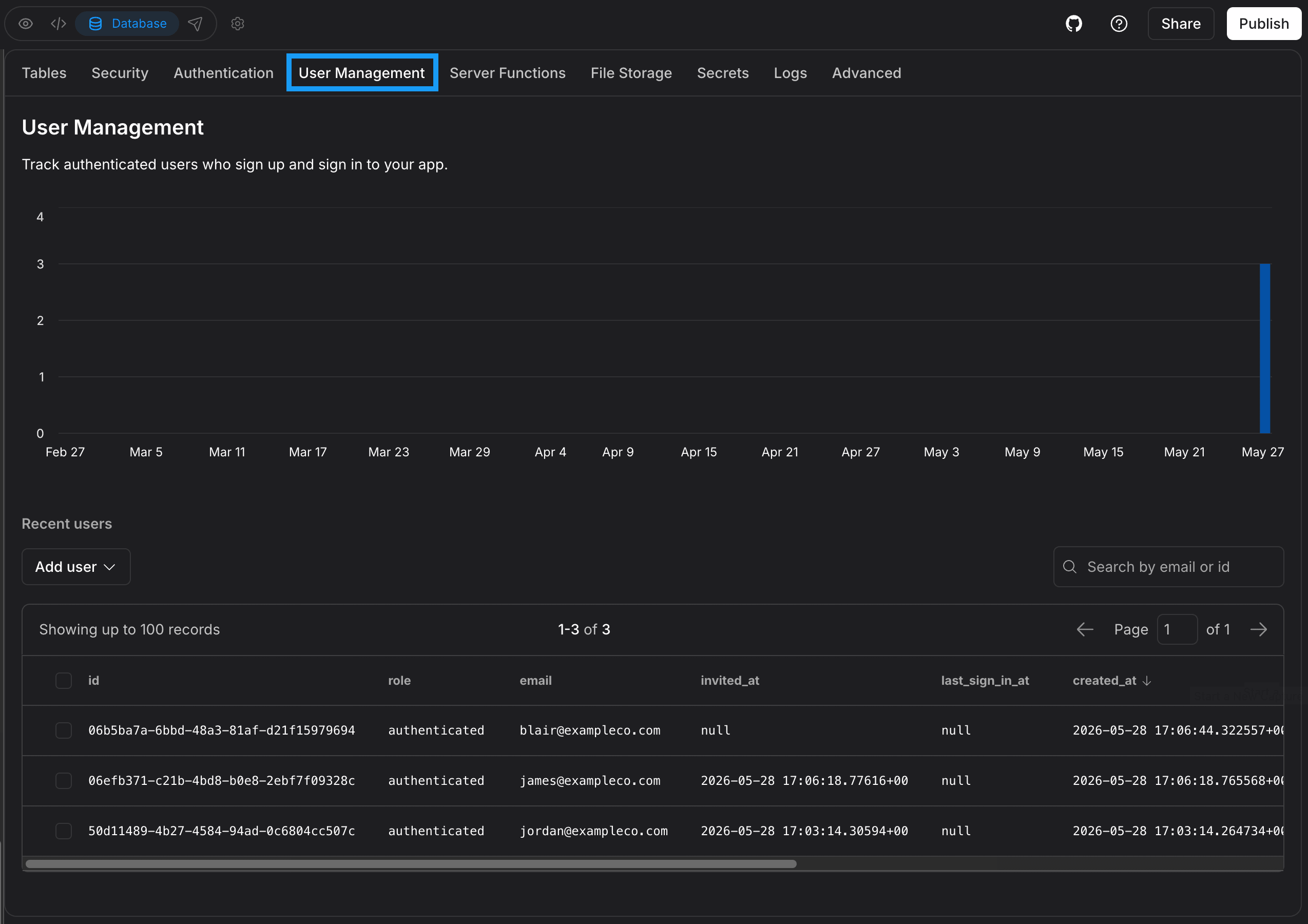 1. Log in to your Bolt project.
2. Click the **database icon** in the top center of your screen.
3. Click **User Management**.
## Who can view and manage users
Seeing the sign-ups graph and user list, and adding, inviting, or deleting users, is limited to certain roles.
The following [roles](/collaboration/sharing#access-by-role) have access:
* **Individual account**: Project owner only.
* **Team account**: Project owner, Co-owners, and [team Admins](/teams/manage-team#team-member-roles) have access. Editors and Viewers don't.
If you don't have access, User Management shows the message, "You do not have permission to manage authentication users" and the **Add user** button isn't available.
## Add new users
From the User Management dashboard, you can add new users by manually creating a row in the database or sending an invitation via email.
Simply click the **Add User** button and then select **Create new user** or **Send invitation**. See the video below for examples.
This documentation is built and hosted on [Mintlify](https://mintlify.com), a developer documentation platform.
1. Log in to your Bolt project.
2. Click the **database icon** in the top center of your screen.
3. Click **User Management**.
## Who can view and manage users
Seeing the sign-ups graph and user list, and adding, inviting, or deleting users, is limited to certain roles.
The following [roles](/collaboration/sharing#access-by-role) have access:
* **Individual account**: Project owner only.
* **Team account**: Project owner, Co-owners, and [team Admins](/teams/manage-team#team-member-roles) have access. Editors and Viewers don't.
If you don't have access, User Management shows the message, "You do not have permission to manage authentication users" and the **Add user** button isn't available.
## Add new users
From the User Management dashboard, you can add new users by manually creating a row in the database or sending an invitation via email.
Simply click the **Add User** button and then select **Create new user** or **Send invitation**. See the video below for examples.
This documentation is built and hosted on [Mintlify](https://mintlify.com), a developer documentation platform.