> ## Documentation Index
> Fetch the complete documentation index at: https://support.bolt.new/llms.txt
> Use this file to discover all available pages before exploring further.
# Check your project's security
> Find and fix security problems in your project.
To help keep your app's data secure, Bolt can check your project for security problems and fix what it finds.
You can run a check at any time while you're building, but we recommend running a security check at least once before you [publish](/cloud/hosting/publish).
There are two types of security checks:
* **Project security audit**: Reviews your whole project, including your code and database, fixes what it can, and flags anything you need to handle. Neither the audit nor its fixes use your tokens. Available on paid plans.
* **Database security check**: Flags issues with your database settings so you can ask Bolt to fix them. Available on all plans.
## Run a security audit
A security audit includes a full review of your entire project.
To run a security audit:
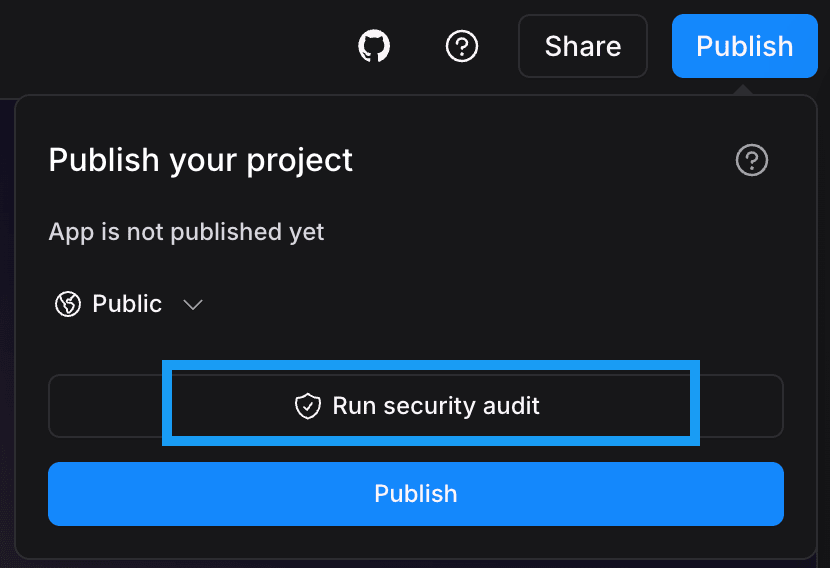
1. In the top-right corner of your screen, click **Publish**.
2. Click **Run security audit**.
3. Wait while Bolt reviews your project. You can follow the progress in the chat.
4. To see what Bolt fixed, expand the summary in the chat.
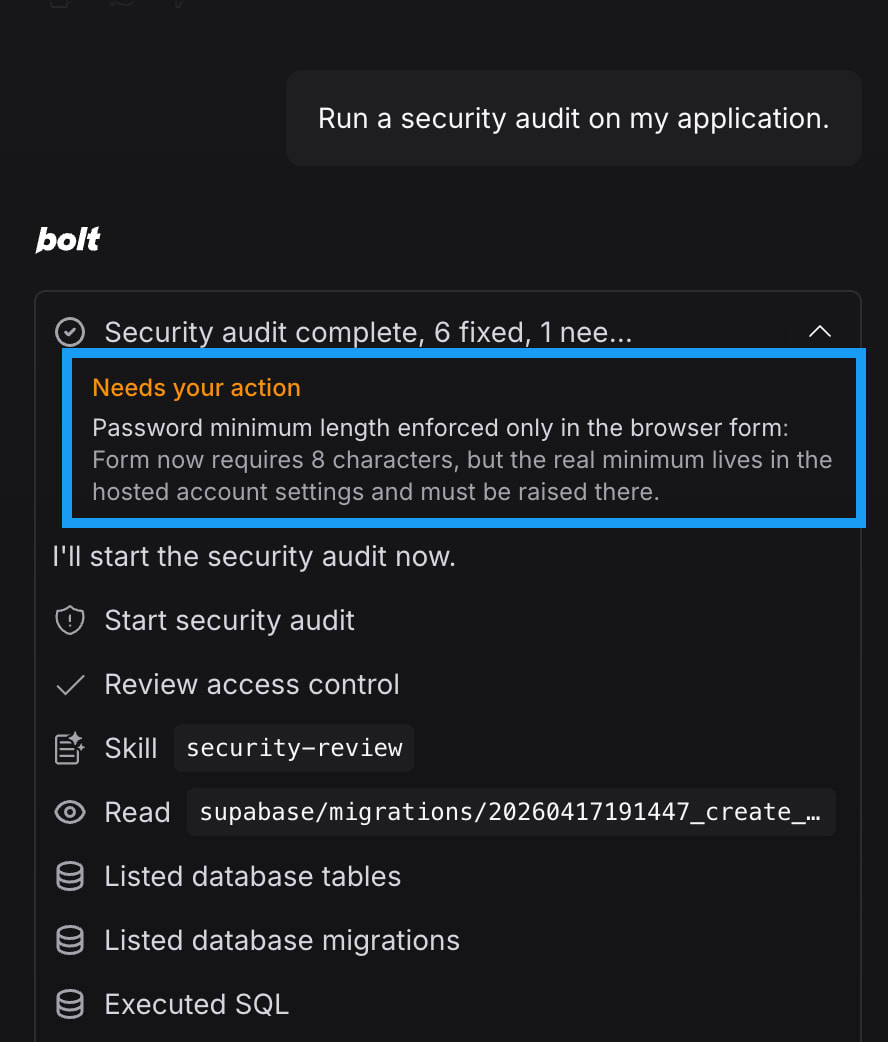
Bolt fixes most problems on its own. Sometimes you may need to make a change yourself, like updating a setting in a service you've connected to your project (for example, your email or payment provider). If you have action items from the security audit, Bolt lists them in the chat and tells you what to do. The following screenshot shows how Bolt flags action items for your review.
When an audit finishes, the **Run security audit** option changes to **Security audit up to date**. You can run the security audit again after you've made new changes to your project.
### What the security audit checks
Bolt checks for the following problems. It skips anything that doesn't apply to your project.
| What Bolt checks | Why it matters |
| --------------------------------------------- | ---------------------------------------------------------------------------------------------------------------------------------------------------------------------------------------------------------------------------------------------------------------------------------------------- |
| **Who can see and change your data** | Your app's users should be able to touch only their own information. Bolt looks for ways one person could see, change, or delete information that isn't theirs. |
| **What information your app makes public** | Bolt checks that the parts of your app anyone can reach, like error messages and sign-in screens, don't reveal private information (for example, whether a particular email address has an account). |
| **How people sign in and stay signed in** | Bolt checks that protected parts of your app require an account and that your app verifies who each user is. It also confirms that signing out ends the session and that your password and email verification rules are strong enough. |
| **Ways your app can be misused** | Bolt checks that users can't do things you don't intend, like changing a price, skipping a required step, or claiming the same single-use item twice. |
| **What input your app accepts from visitors** | Your app should check any input a visitor sends to the site. Bolt looks at file uploads, links your app opens on someone's behalf, and text your app displays as part of a page, since someone could use this text to run their own code. |
| **Your keys and security settings** | Bolt checks that [private keys](/cloud/database/secrets) and passwords aren't stored in your project's code or sent to visitors' browsers. It also checks which other websites can talk to your app, and whether what a user types can get sent to your database without being verified first. |
### Daily limit
You can run up to 30 security audits per day. Bolt tells you when you reach the limit, which resets each day at midnight UTC. If you need to run more audits per day than the limit allows, [contact support](/troubleshooting/contact-support).
## Review database security issues
Bolt can also perform a lightweight review of your database that's independent of the full security audit. This review checks your database rules and permissions and flags anything that could make your data insecure, like a permission rule that allows anyone to read a table. You can view the results on the **Security** tab of your database settings.
For instructions, see [Database: Security settings](/cloud/database/security).
The full security audit includes checks on your database. If you already [ran an audit](#run-a-security-audit), you don't need this separate review of your database.
## Go back to an earlier version
To fix security issues, Bolt makes changes to your project's code or database. If a fix updates something you didn't want changed, you can use Bolt's [version history](/building/using-bolt/rollback-backup) to go back to how your project was before.
Going back to a version from before the fix also removes the security changes Bolt made. If you want to keep those changes and adjust something else, describe what you want in the chat instead.