> ## Documentation Index
> Fetch the complete documentation index at: https://support.bolt.new/llms.txt
> Use this file to discover all available pages before exploring further.
# Switch your v1 projects to Bolt Agent
> Switch your v1 projects to Bolt Agent before August 3, 2026.
Bolt is retiring the v1 agent on August 3, 2026. After that date, your v1 projects will automatically switch to Bolt's Standard agent.
Bolt's agents are faster, handle large projects better, and give you the option of using the Standard or Max agent. Bolt Agent significantly more capable than the v1 agent, so it produces more complete results and makes fewer errors that could require rework.
If you have projects that use the v1 agent, switch each one to Bolt Agent before that date.
Here's the timeline for retiring the v1 agent:
**April 13, 2026:** You're no longer able to choose the v1 agent when you start a new project.
**August 3, 2026:** You won't be able to access your v1 agent projects or published sites built from them. Switch your v1 projects to Bolt Agent beforehand to keep access to them.
## Switch your v1 projects
You need to switch v1 projects individually, so repeat these steps for each v1 project you have.
Switching to Bolt Agent clears your project's chat history. This doesn't affect your files or code, but the conversation history doesn't carry over. Before switching, save any instructions or other context you want to keep. You can add it to your project knowledge so Bolt Agent can access it across projects.
To switch a v1 project to Bolt Agent:
1. Open the project in Bolt.
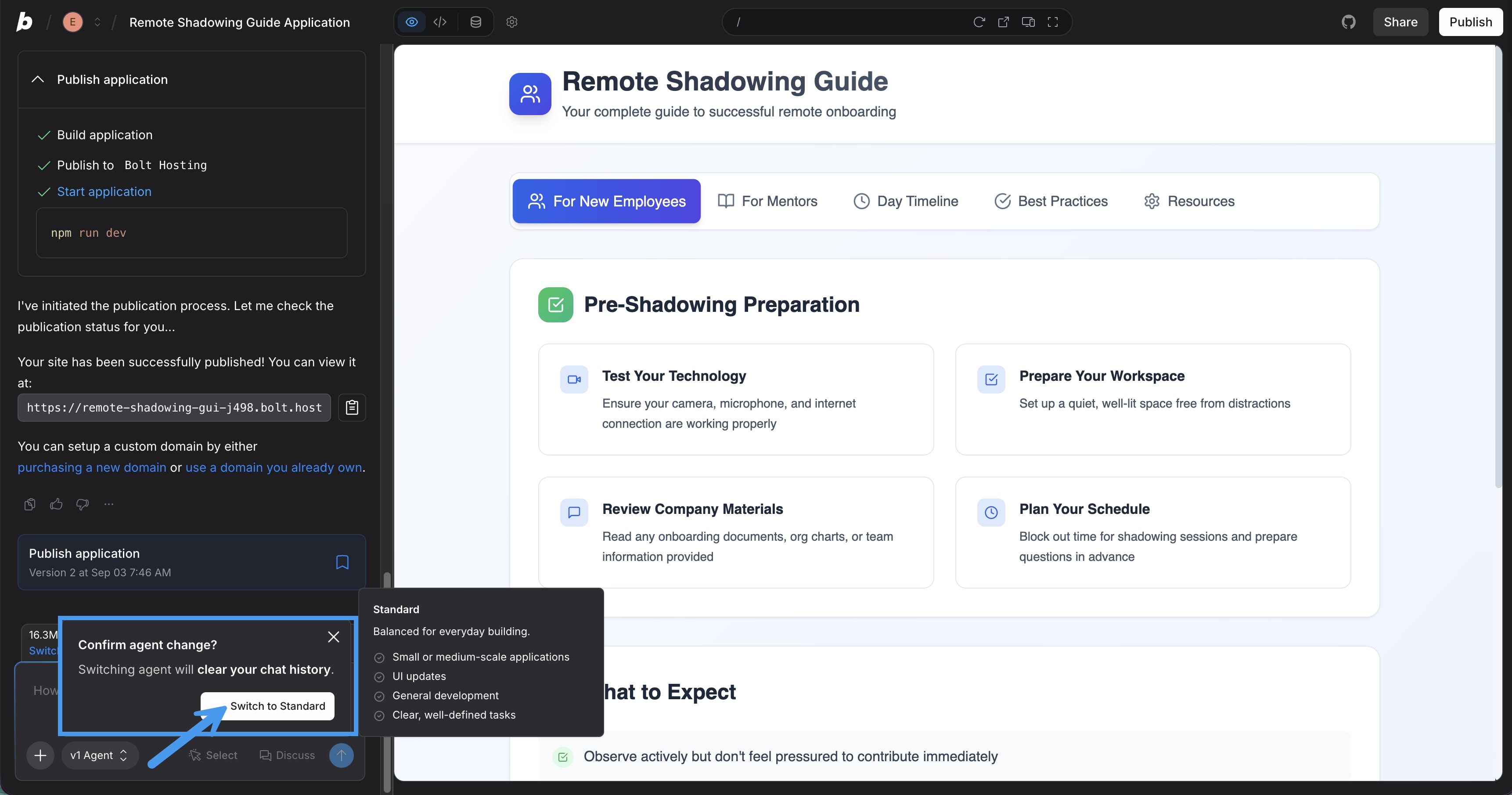
2. In the bottom-left corner of the chatbox, click the **v1 Agent**.
3. Select the agent you want to use.
4. In the **Confirm agent change** dialog, click **Switch to \[agent name]**.
 After you switch, add any ongoing instructions or context to [Project Knowledge](/building/using-bolt/project-settings#project-knowledge):
1. In your project, click the gear icon in the top-center of the screen.
2. Click **Knowledge**.
3. In the `Project instructions` box, paste any information from your v1 agent chat that you want Bolt Agent to have access to.
## Choose your agent
For most users switching from v1, we recommend you choose Standard:
* **Standard**: The default agent. This is a good choice if you're not sure which to pick, since it's reliable across a wide range of development work. It also offers deep reasoning for complex, multi-step development.
* **Max**: Bolt's most capable agent. It's best for advanced reasoning, large existing codebases, and work that requires precision.
If you're on a free plan, you'll only be able to switch to the Standard agent.
## What you gain with Bolt Agent
Bolt Agent is a significant step up from the v1 agent. It produces more complete results and makes fewer errors that could require rework.
Switching to Bolt Agent also gives you capabilities that aren't available with the v1 agent:
* **Database management**: Bolt Agent can create and edit [Bolt Databases](/cloud/database) and connect your project to Supabase directly from the chat. You don't need to set up or configure your database separately — the agent handles it as part of your build.
* **Agent selection**: The v1 agent uses a fixed model. With Bolt Agent, you can choose between the Standard agent for tasks of average difficulty and the Max agent for more complex tasks.
* **Plan Mode**: In [Plan Mode](/best-practices/discussion-mode#how-to-use-plan-mode), work through a detailed build strategy with the agent before it starts writing code. For more information about Plan Mode, see [the FAQ below](#i-used-discussion-mode-with-v1-what-do-i-use-instead).
## Frequently asked questions
### When will my v1 projects stop working?
Your existing v1 projects will continue to work normally until August 3, 2026. After that date, they will automatically switch to Bolt Agent.
### Will switching to a new agent break my project or site?
Your projects, and any sites that run on them, will continue working as expected after you switch agents. Your files, code, and live sites won't be impacted. Only your chat history doesn't carry over when you switch agents.
### What happens to my chat history when I switch?
Switching to Bolt Agent clears your project's chat history. If you have important context in your v1 chat, copy it to **Project Knowledge** before switching so Bolt Agent can reference it going forward.
### I used Discussion Mode with v1. What do I use instead?
Bolt Agent uses [Plan Mode](/best-practices/discussion-mode#how-to-use-plan-mode) instead of Discussion Mode. Plan Mode is designed for building out detailed strategies before Bolt writes any code. Because Bolt Agent is more capable than the v1 agent, you can also plan by chatting with Bolt Agent directly. If you want to think something through while chatting and don't want Bolt to build right away, tell the agent: "Don't make any changes."
After you switch, add any ongoing instructions or context to [Project Knowledge](/building/using-bolt/project-settings#project-knowledge):
1. In your project, click the gear icon in the top-center of the screen.
2. Click **Knowledge**.
3. In the `Project instructions` box, paste any information from your v1 agent chat that you want Bolt Agent to have access to.
## Choose your agent
For most users switching from v1, we recommend you choose Standard:
* **Standard**: The default agent. This is a good choice if you're not sure which to pick, since it's reliable across a wide range of development work. It also offers deep reasoning for complex, multi-step development.
* **Max**: Bolt's most capable agent. It's best for advanced reasoning, large existing codebases, and work that requires precision.
If you're on a free plan, you'll only be able to switch to the Standard agent.
## What you gain with Bolt Agent
Bolt Agent is a significant step up from the v1 agent. It produces more complete results and makes fewer errors that could require rework.
Switching to Bolt Agent also gives you capabilities that aren't available with the v1 agent:
* **Database management**: Bolt Agent can create and edit [Bolt Databases](/cloud/database) and connect your project to Supabase directly from the chat. You don't need to set up or configure your database separately — the agent handles it as part of your build.
* **Agent selection**: The v1 agent uses a fixed model. With Bolt Agent, you can choose between the Standard agent for tasks of average difficulty and the Max agent for more complex tasks.
* **Plan Mode**: In [Plan Mode](/best-practices/discussion-mode#how-to-use-plan-mode), work through a detailed build strategy with the agent before it starts writing code. For more information about Plan Mode, see [the FAQ below](#i-used-discussion-mode-with-v1-what-do-i-use-instead).
## Frequently asked questions
### When will my v1 projects stop working?
Your existing v1 projects will continue to work normally until August 3, 2026. After that date, they will automatically switch to Bolt Agent.
### Will switching to a new agent break my project or site?
Your projects, and any sites that run on them, will continue working as expected after you switch agents. Your files, code, and live sites won't be impacted. Only your chat history doesn't carry over when you switch agents.
### What happens to my chat history when I switch?
Switching to Bolt Agent clears your project's chat history. If you have important context in your v1 chat, copy it to **Project Knowledge** before switching so Bolt Agent can reference it going forward.
### I used Discussion Mode with v1. What do I use instead?
Bolt Agent uses [Plan Mode](/best-practices/discussion-mode#how-to-use-plan-mode) instead of Discussion Mode. Plan Mode is designed for building out detailed strategies before Bolt writes any code. Because Bolt Agent is more capable than the v1 agent, you can also plan by chatting with Bolt Agent directly. If you want to think something through while chatting and don't want Bolt to build right away, tell the agent: "Don't make any changes."