> ## Documentation Index
> Fetch the complete documentation index at: https://support.bolt.new/llms.txt
> Use this file to discover all available pages before exploring further.
# Release Notes
> Keep up to date with Bolt's latest features and improvements, with links to relevant documentation.
## Updates
### Leaked password protection is turned on for new Bolt databases
The new **Prevent Leaked Passwords** setting lets Bolt check the passwords your site's users create against a list of passwords that have appeared in known data breaches. If a user's password matches, Bolt asks them to choose a different one. Blocking leaked passwords protects your site and its users by keeping bad actors out of accounts that don't belong to them.
**Prevent Leaked Passwords** is turned on by default for new databases Bolt creates.
If you have an existing Bolt database, we recommend you turn on **Prevent Leaked Passwords** in your database authentication settings.
1. In your project, click the **database icon**.
2. Click **Authentication**, then click the **Email** row.
3. Turn on **Prevent Leaked Passwords**.
Turning on password protection doesn't affect users who've already signed up on your site. Bolt checks passwords only when a user creates a new password or changes their existing one.
Learn more about [leaked password protection](/cloud/database/authentication#leaked-password-protection).
## Updates
### Manage your database settings all in one place
Your project's database settings now live in one place, accessible from the **database icon** at the top center of your project. Authentication, File Storage, Logs, Secrets, Server Functions, Tables, and User Management are all reachable from the Database Settings view. Database-related plan limits remain on the **Cloud** settings page, which appears under Account settings for individual accounts and under Team settings for Teams accounts.
Learn more about [Bolt Database settings](/cloud/database) and [viewing your database limits](/cloud/database#view-bolt-database-limits).
## New features
### Export Google Stitch designs directly to Bolt
When your designs are ready in [Google Stitch](https://stitch.withgoogle.com), you can now export them straight to Bolt with a single click. Bolt opens with your page screenshots and HTML already attached and a prompt prepopulated, so you can go from design to a working app in one step.
Learn more about [exporting your Stitch designs to Bolt](/integrations/google-stitch#export-your-designs-to-bolt).
### Restart your database
If your project's database becomes unresponsive, times out, or has connection issues, you can now restart it from the database's Advanced settings to try to restore the connection.
Learn more about [restarting your database](/cloud/database/advanced#restart-your-database).
## Updates
### Guided questions in Enhance prompt
When you use **Enhance prompt** in the chatbox, Bolt now asks a few guided questions about what you're building before generating the enhanced prompt. Your answers give Bolt more context, leading to a stronger starting point for your project.
Learn more about [enhancing your prompts](/best-practices/prompting-effectively#enhance-your-prompts).
### Open in StackBlitz on projects with updated code storage
As we update how Bolt stores project code, the [**Open in StackBlitz** export option](/building/using-bolt/projects-files#open-a-project-in-stackblitz) is no longer available for new projects or existing projects that have moved to the new format. If you click **Export** and see **Open in StackBlitz** grayed out, your project is using the new format. You can still edit your code directly in Bolt using [Code View](/building/using-bolt/code-view).
## Updates
### Choose a Bolt agent
Bolt now offers two agents, Standard and Max, instead of individual model options. Each agent is suited to a different kind of work: Standard is balanced for everyday building, and Max provides deeper reasoning for complex tasks. Bolt handles model selection behind the scenes based on the agent you choose.
As models evolve, keeping track of model names, versions, and how each one performs on different tasks adds complexity that doesn't need to fall on you. This change gives Bolt more flexibility to improve how agents perform as the technology behind them evolves. You choose the agent that matches your work, and Bolt takes care of the rest.
To learn more, see [Choose an agent](/building/using-bolt/agents).
## New features
### Connect Bolt to a GitHub organization
GitHub organization admins can now install the Bolt.new GitHub app at the organization level and choose which repositories Bolt users can access. Members of the organization can work with approved repositories in Bolt without connecting their own personal GitHub account, giving teams centralized control over permissions and access.
Learn more about [setting up GitHub organization access](/integrations/github-org).
## New features
### Real-time multiplayer collaboration
Collaborators can now work in the same Bolt project at the same time. Users who have access can prompt and edit alongside you, and you'll see when others are typing. Every project has a single shared chat thread, and Bolt processes one prompt at a time to prevent conflicts. When a collaborator prompts in your project, Bolt uses tokens from their account rather than yours.
Learn more about [collaborating in real time](/building/using-bolt/collaborate#work-together-in-real-time).
### Projects dashboard
You can now see your projects and your team's projects in one view on the Projects dashboard. You can manage projects by starring, renaming, or transferring them without having to open them first. From the sidebar, you can filter to view only projects **Created by you**, **Starred**, **Recently viewed**, and **Shared with you**.
Learn more about the [projects dashboard](/building/using-bolt/collaborate#use-the-projects-dashboard).
## Updates
### Role-based sharing and publishing
You can now control access to your projects with three roles:
* Viewer can view and duplicate the project.
* Editor can prompt and edit the code.
* Co-owner has full control, including managing access.
You can invite teammates by email, pick from your team directory, or set a team-wide default role (Co-owner, Editor, Viewer, or No access) so new projects start with the right permissions.
Publishing is now fully separate from project sharing. When you publish a project as a site, you can set the site visibility to Public (anyone on the web can view it) or Private (only people you invite or who match a trusted email domain, such as yourcompany.com, can view it). Only the project owner and co-owners can publish or change site visibility. Environment variables are never visible to viewers, so you can share projects without exposing secrets.
Learn more about [sharing your project](/building/using-bolt/sharing) and [publishing your project as a live site](/cloud/hosting/publish).
## New features
### Opus 4.7 is now available
Opus 4.7 is the most capable model available in Bolt, with stronger reasoning across complex, long-running tasks. It builds more complete features with fewer gaps and errors, and handles large projects that require reasoning across many files and dependencies. Opus 4.7 uses more tokens per task than Sonnet 4.6, but the additional usage goes toward more complete code and deeper reasoning.
Learn more about [Opus 4.7 and other available models](/building/using-bolt/agents#opus-4-7).
### Attach or detach a design system from an existing project
You can now attach, detach, or switch the design system on an existing project from your project settings. Previously, you could only select a design system when starting a new project. Attaching a design system doesn't make immediate changes to your project code: you have to prompt Bolt to update the specific components you want to change.
Learn more about [attaching or detaching a design system](/building/design-system/use-design-system#attach-or-detach-a-design-system-from-an-existing-project).
## Updates
### Teams admins can control published site visibility
Teams admins can now select whether published sites are public or private across all team projects. Choose from **User specified**, **Private only**, or **Public only** in your team settings. When set to Private only or Public only, team members can't change the site visibility in the Publish menu.
Learn more about [setting published site visibility](/settings/team-settings#set-published-site-visibility).
### Disconnect a project from GitHub
You can now disconnect an individual Bolt project from its linked GitHub repository without removing your GitHub integration entirely. This gives you more flexibility to manage how your projects are connected to version control.
Learn more about [disconnecting a project from GitHub](/integrations/git#disconnect-a-project-from-github).
### v1 Agent is no longer available for new projects
As of April 13, 2026, you can no longer select v1 Agent (legacy) when starting a new project. Existing v1 projects continue to work until August 3, 2026, when they'll be automatically switched to Claude Agent.
Learn how to [switch your v1 projects to Claude Agent](/building/switch-v1-projects).
## Improvements
### Sonnet 4.6 is now the default model
Sonnet 4.6 is now the default model in Bolt, offering the best balance of speed, cost, and reasoning depth for everyday building tasks. This change reflects the strong performance of Sonnet 4.6 across planning, coding, debugging, and iterative development.
As part of this update, Sonnet 4.5 and Opus 4.5 are no longer available. You can continue to use Haiku 4.5 for quick edits and Opus 4.6 for the most complex reasoning tasks.
Learn more about [available models](/building/using-bolt/agents#compare-models).
### Pick from layers when selecting UI elements
The **Select** tool now includes a **Pick from layers** option. When turned on, you can choose from all the overlapping elements at a location — making it easier to target a card or section rather than the button or heading inside it.
Learn more about [selecting a UI element](/building/using-bolt/interacting-ai#select-a-ui-element).
### Tag files and folders in your prompts
You can now type `@` in the chatbox to mention a specific project file or folder in your prompt. Bolt shows a filterable list of matching resources as you type, so you can quickly reference exactly what you want the AI to focus on.
Learn more about [tagging a project file or folder](/building/using-bolt/interacting-ai#tag-a-project-file-or-folder).
## New features
### Design systems in Bolt are now available
Paid Teams can now upload their design system to Bolt and use it across projects. Bolt reads your documentation and component library sources to generate a browsable Storybook inside Bolt and uses it as a reference when building UIs. Uploaded design systems appear in the Design System selector on the Bolt homepage.
All users can explore and build with pre-loaded design systems, including Porsche, Cloudscape, and others, directly from the homepage.
To get started, see the [Introduction to design systems](/building/design-system/introduction).
## Updates
### v1 Agent retirement
The v1 Agent (legacy) is being retired. Starting April 13, 2026, you won't be able to select it for new projects. After August 3, 2026, v1 projects and sites built from them will no longer be accessible. Switch your existing v1 projects to Claude Agent before that date.
Learn how to [switch your v1 projects to Claude Agent](/building/switch-v1-projects).
## New features
### Generate images directly in Bolt
You can now generate AI images directly from the Bolt chatbox. Describe what you want, and Bolt creates a ready-to-use image for your project, complete with transparent background support and automatic WebP conversion for fast loading.
Before you can generate images, you need to turn on **Image Generation** in **Personal Settings** > **Add-on features**.
Learn more about [generating AI images](/building/using-bolt/interacting-ai#generate-ai-images-for-your-project).
### Connect an MCP server
You can now connect MCP (Model Context Protocol) servers to Bolt. This lets you bring in real-world context directly from the external tools and data sources you use. For example, you could connect Notion to let Bolt read or edit your pages, Linear to pull in task context, or GitHub to work with issues and pull requests, all without switching between apps.
Bolt includes built-in connectors for popular tools, and you can also add a custom connector using any compatible MCP server URL.
To get started, click the **plus icon** in the chatbox, then click **Connectors** > **Manage connectors**.
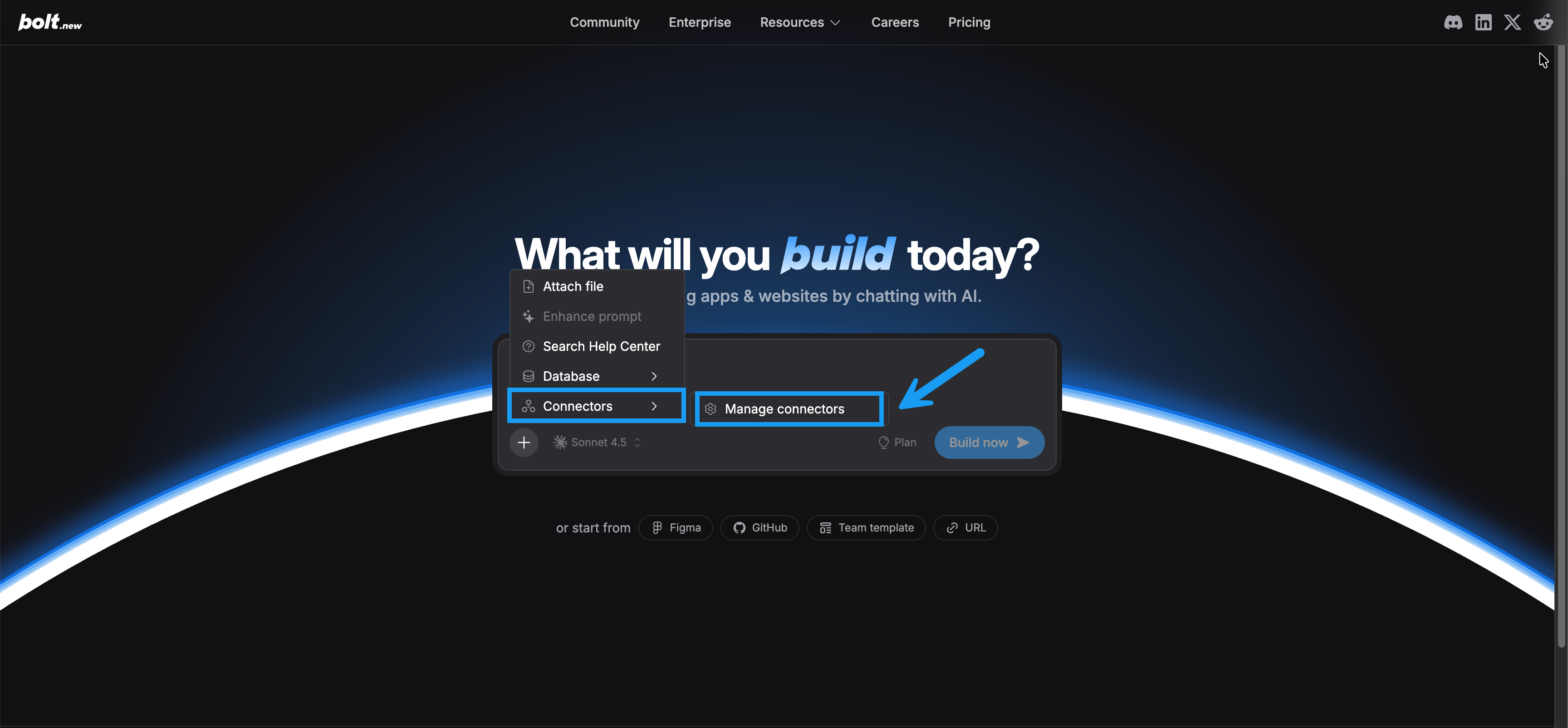 Learn more about [connecting an MCP server](/building/using-bolt/connect-mcp).
## New features
### Claude Sonnet 4.6 model release
Learn more about [connecting an MCP server](/building/using-bolt/connect-mcp).
## New features
### Claude Sonnet 4.6 model release
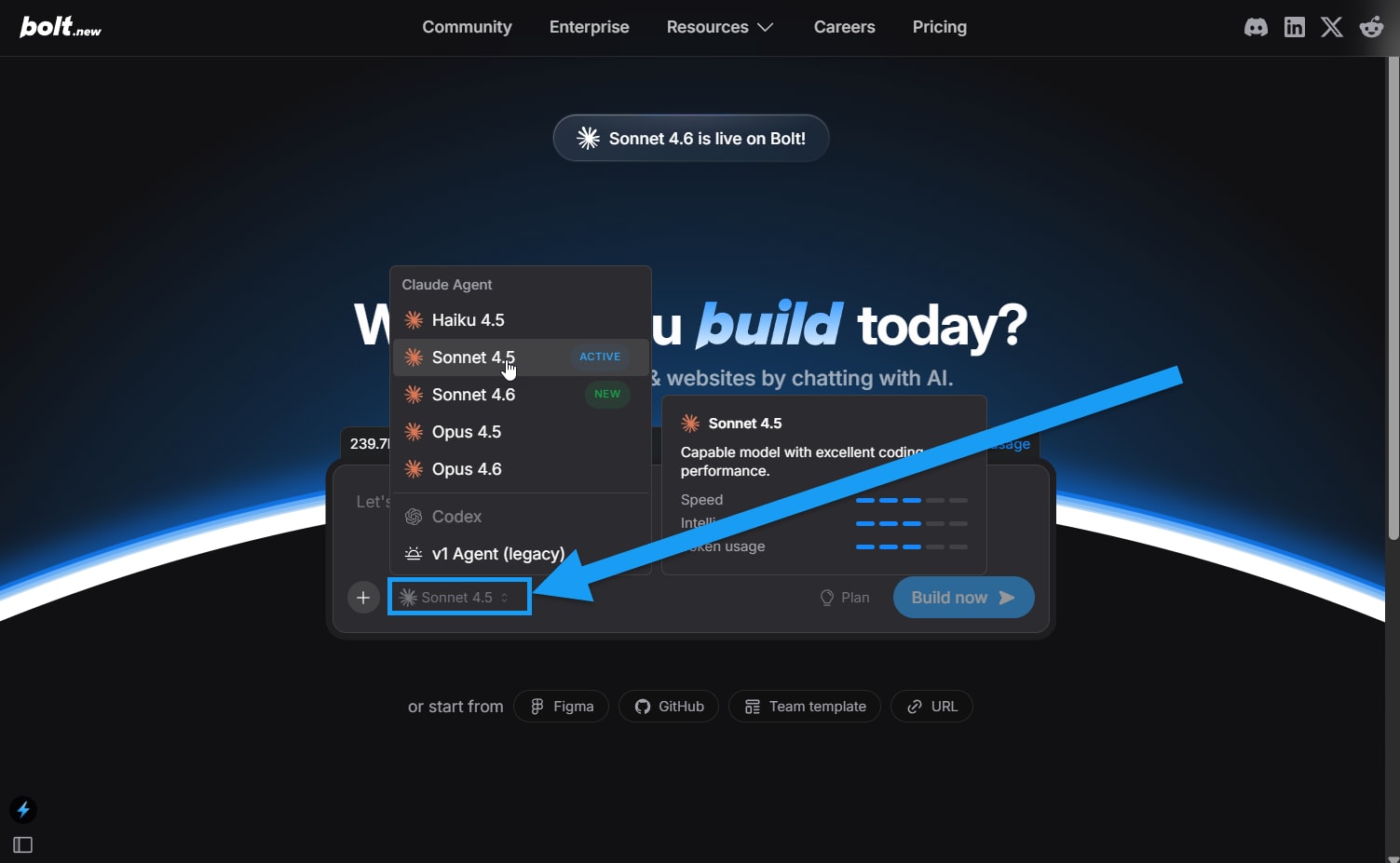 Sonnet 4.6 is now available in Bolt, offering a strong balance of speed, cost, and reasoning depth for everyday building tasks. It performs well across planning, coding, debugging, and iterative development, making it a reliable default for most projects.
You can switch to Sonnet 4.6 from the agent selector to use it for new conversations or ongoing work.
Learn more about using [Sonnet 4.6 and other models](/building/using-bolt/agents#sonnet-4-6).
### Team templates
Teams can now create reusable templates from existing projects to standardize structure, configuration, and starter files across the organization. Launching a template generates a new project while leaving the original unchanged, helping teammates start faster with a consistent foundation. They are only available on Teams plans.
Learn more about [Team templates](/account-and-subscription/teams/team-templates).
### Update your Netlify URL
While you have been able to [update your bolt.host URL](/cloud/hosting/publish#change-your-bolt-host-url) for some time, you can now also update your Netlify URL after publishing. This makes it easier to refine your public address, align with naming changes, or correct mistakes without redeploying a new site.
Learn how to [change your Netlify URL](/integrations/netlify#change-your-netlify-url).
### Anthropic Opus 4.6 model release
Sonnet 4.6 is now available in Bolt, offering a strong balance of speed, cost, and reasoning depth for everyday building tasks. It performs well across planning, coding, debugging, and iterative development, making it a reliable default for most projects.
You can switch to Sonnet 4.6 from the agent selector to use it for new conversations or ongoing work.
Learn more about using [Sonnet 4.6 and other models](/building/using-bolt/agents#sonnet-4-6).
### Team templates
Teams can now create reusable templates from existing projects to standardize structure, configuration, and starter files across the organization. Launching a template generates a new project while leaving the original unchanged, helping teammates start faster with a consistent foundation. They are only available on Teams plans.
Learn more about [Team templates](/account-and-subscription/teams/team-templates).
### Update your Netlify URL
While you have been able to [update your bolt.host URL](/cloud/hosting/publish#change-your-bolt-host-url) for some time, you can now also update your Netlify URL after publishing. This makes it easier to refine your public address, align with naming changes, or correct mistakes without redeploying a new site.
Learn how to [change your Netlify URL](/integrations/netlify#change-your-netlify-url).
### Anthropic Opus 4.6 model release
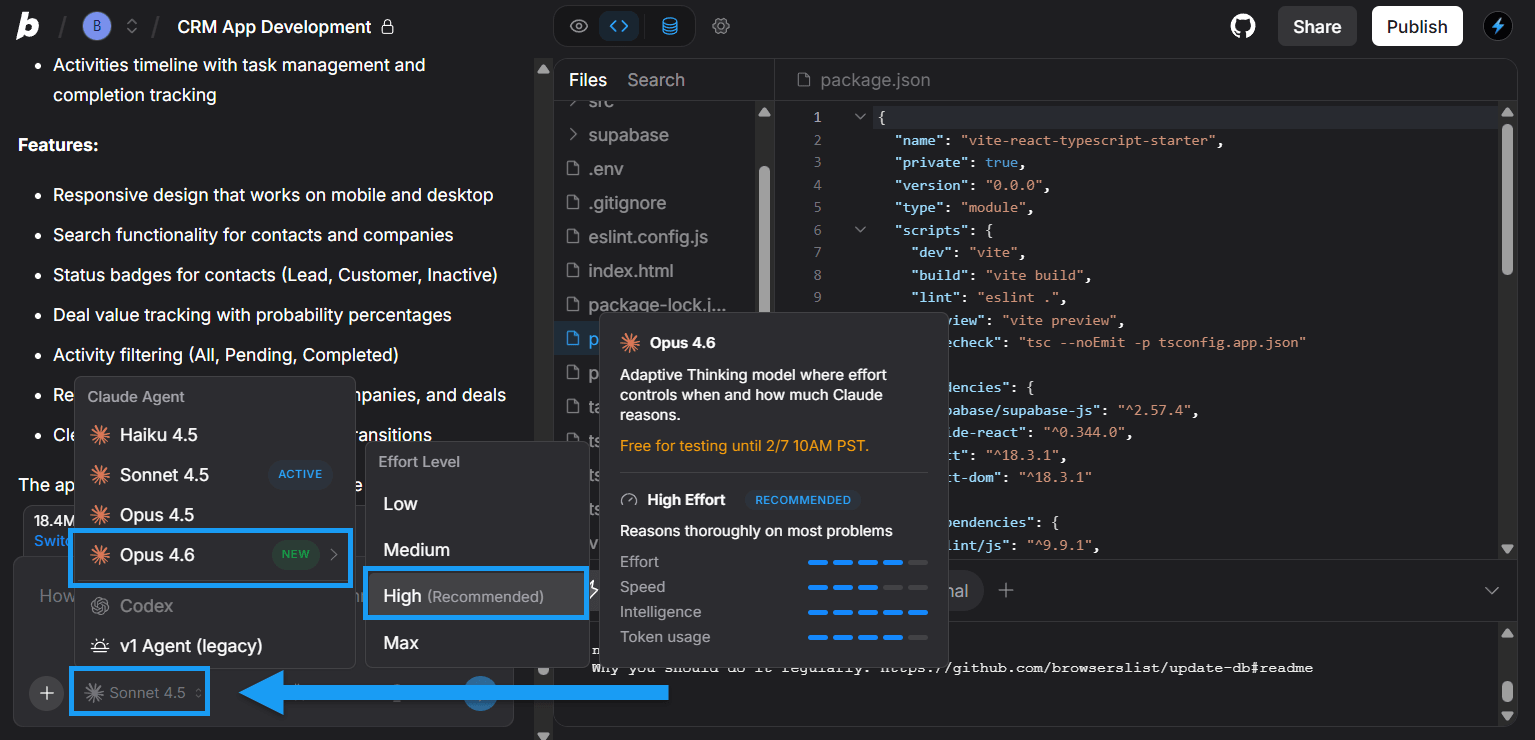 Bolt now includes the Opus 4.6 model, giving you more control over your building. With variable effort selection, you can choose lighter or deeper reasoning depending on what you are building, which helps balance speed, cost, and output quality.
Learn more about using [Opus 4.6 and effort settings](/building/using-bolt/agents#opus-4-6).
## New features
### Figma import into projects
You can now import Figma frames straight into the chatbox. This makes it easier to reference designs while you build, iterate, or ask questions, without switching tools or copying links back and forth.
This integration helps keep design context close to your conversation and speeds up collaboration between design and development work.
Learn [how to import a Figma frame from the chatbox](/integrations/figma#import-a-figma-frame-from-the-chatbox).
### Private site sharing
Bolt now includes the Opus 4.6 model, giving you more control over your building. With variable effort selection, you can choose lighter or deeper reasoning depending on what you are building, which helps balance speed, cost, and output quality.
Learn more about using [Opus 4.6 and effort settings](/building/using-bolt/agents#opus-4-6).
## New features
### Figma import into projects
You can now import Figma frames straight into the chatbox. This makes it easier to reference designs while you build, iterate, or ask questions, without switching tools or copying links back and forth.
This integration helps keep design context close to your conversation and speeds up collaboration between design and development work.
Learn [how to import a Figma frame from the chatbox](/integrations/figma#import-a-figma-frame-from-the-chatbox).
### Private site sharing
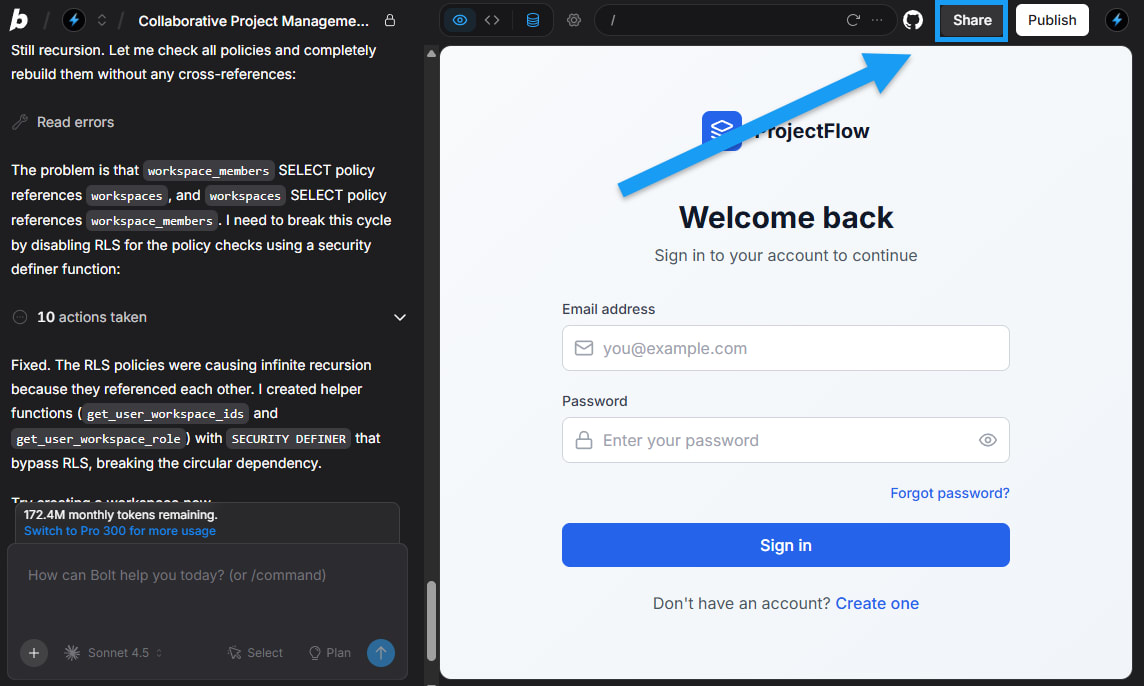 You can now share your working prototypes privately with others without exposing your project files. Use the new **Share** option in the top-right corner of your screen to create a private link that invited viewers can open in their browser.
People with the link can explore your hosted app, provide feedback, or test features before public launch. Sharing is available on paid plans, and on Teams plans you can also whitelist an email domain for easier internal access.
Learn more about [Sharing](/building/using-bolt/sharing).
### AI image editing with Nano Banana
You can now edit and refine images directly inside the Bolt chatbox. When you select an existing image in your project, you can ask Bolt to make specific edits using the Nano Banana model. Bolt updates only the part of the image you describe while keeping the rest of the design intact.
This feature is only available on paid plans. To learn more, see [AI image editing](/building/using-bolt/interacting-ai#ai-image-editing).
### Additional improvements
* You can now start projects using Supabase as your default project database. Learn more about [starting projects using Supabase](/integrations/supabase#start-a-project-using-supabase).
* You can now use a `claude.md` file to manage project context. To learn more, see [Using claude.md files with agents](/building/using-bolt/agents#use-claudemd-files).
* Want to purchase a domain but don't have a project to attach it to yet? No problem, learn about [purchasing a domain without attaching it to a project](/cloud/domains/purchase#purchase-a-domain-without-attaching-it-to-a-project).
## New Haiku 4.5 and Opus 4.5 models released
When working with Claude Agent, you now have the option to select from one of three Anthropic models: **Haiku 4.5**, **Sonnet 4.5** (default), or **Opus 4.5**.
To learn more, watch the video above or read about [Agents and models](/building/using-bolt/agents).
## New features
### Copy and export database data
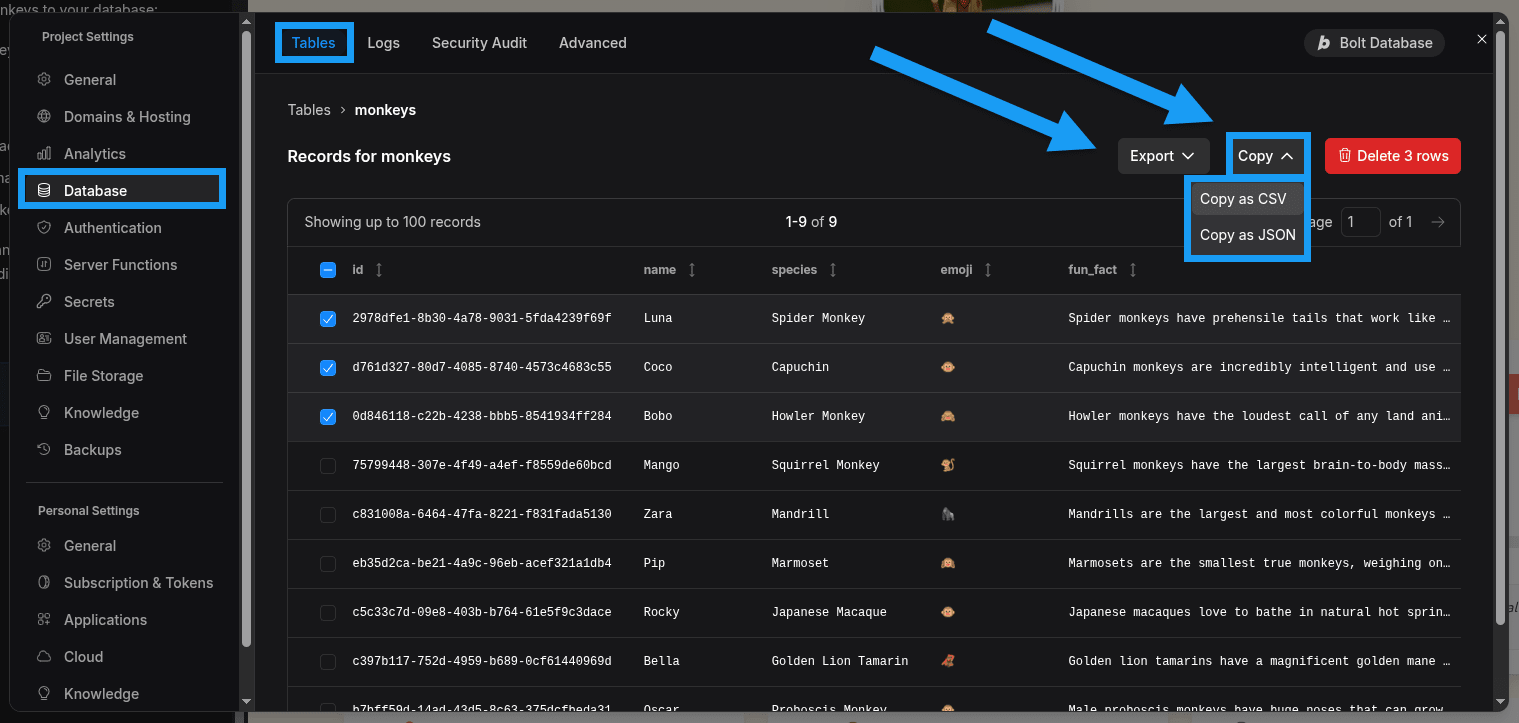
You can now easily [copy or export row data from your databases](/cloud/database/tables#export-or-copy-table-data) using the Tables section of Database Settings.
Select the rows you want, then choose **Copy** or **Export** to get the data in the format you want.
You can now share your working prototypes privately with others without exposing your project files. Use the new **Share** option in the top-right corner of your screen to create a private link that invited viewers can open in their browser.
People with the link can explore your hosted app, provide feedback, or test features before public launch. Sharing is available on paid plans, and on Teams plans you can also whitelist an email domain for easier internal access.
Learn more about [Sharing](/building/using-bolt/sharing).
### AI image editing with Nano Banana
You can now edit and refine images directly inside the Bolt chatbox. When you select an existing image in your project, you can ask Bolt to make specific edits using the Nano Banana model. Bolt updates only the part of the image you describe while keeping the rest of the design intact.
This feature is only available on paid plans. To learn more, see [AI image editing](/building/using-bolt/interacting-ai#ai-image-editing).
### Additional improvements
* You can now start projects using Supabase as your default project database. Learn more about [starting projects using Supabase](/integrations/supabase#start-a-project-using-supabase).
* You can now use a `claude.md` file to manage project context. To learn more, see [Using claude.md files with agents](/building/using-bolt/agents#use-claudemd-files).
* Want to purchase a domain but don't have a project to attach it to yet? No problem, learn about [purchasing a domain without attaching it to a project](/cloud/domains/purchase#purchase-a-domain-without-attaching-it-to-a-project).
## New Haiku 4.5 and Opus 4.5 models released
When working with Claude Agent, you now have the option to select from one of three Anthropic models: **Haiku 4.5**, **Sonnet 4.5** (default), or **Opus 4.5**.
To learn more, watch the video above or read about [Agents and models](/building/using-bolt/agents).
## New features
### Copy and export database data
You can now easily [copy or export row data from your databases](/cloud/database/tables#export-or-copy-table-data) using the Tables section of Database Settings.
Select the rows you want, then choose **Copy** or **Export** to get the data in the format you want.
 ### Subdomains as primary domains
You can now [use a subdomain as the primary domain](/cloud/domains/connect#subdomains-as-primary-domains) for your published Bolt projects. You may add it as an alias first and then set it as primary, or connect it as the primary domain right from the start.
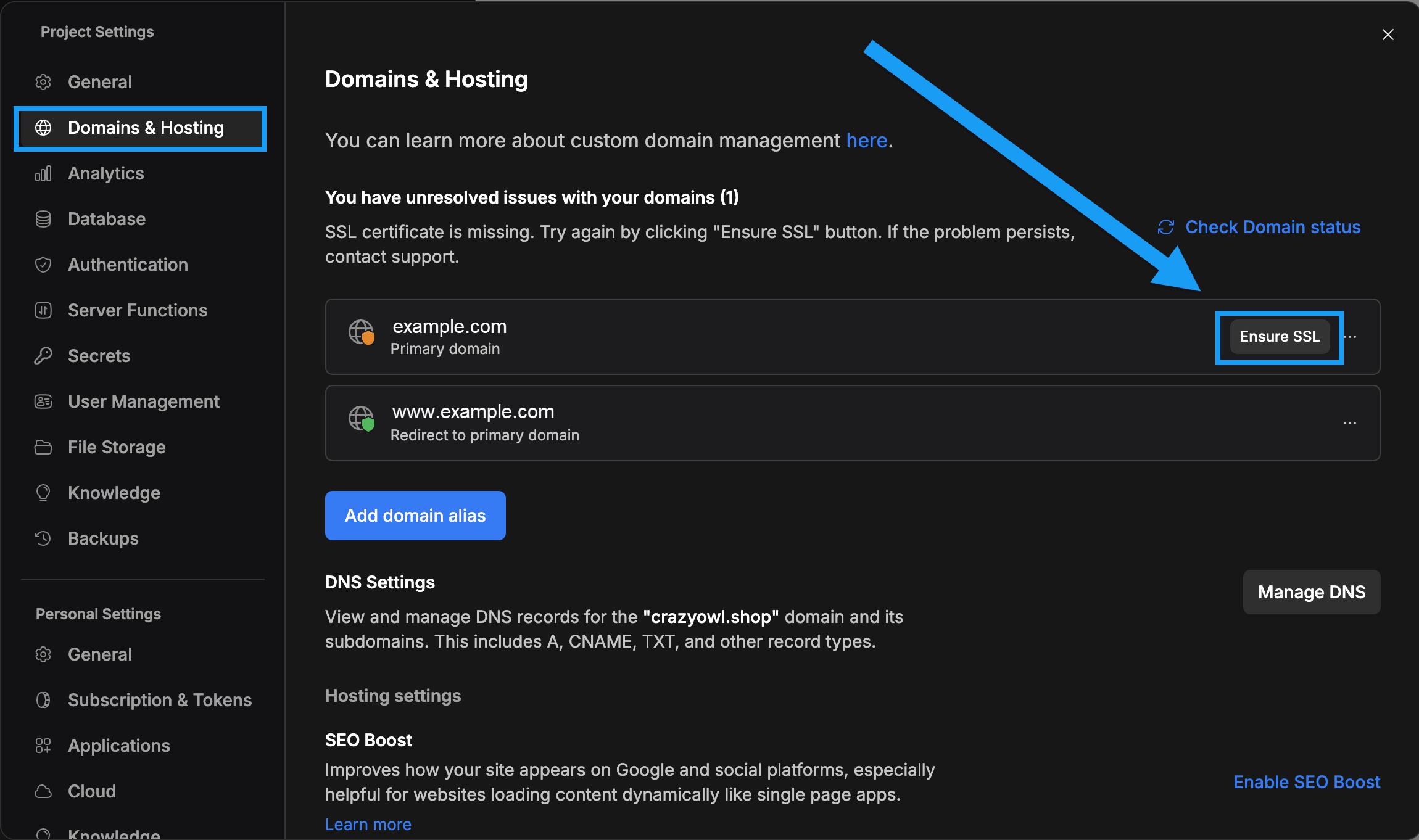
### Manual SSL certificate requests
If your published project is having trouble generating an SSL certificate, you can now [request one manually](/cloud/domains/ssl-https#manually-request-an-ssl-certificate). This helps you resolve certificate issues without waiting for the automatic process to retry.
### Subdomains as primary domains
You can now [use a subdomain as the primary domain](/cloud/domains/connect#subdomains-as-primary-domains) for your published Bolt projects. You may add it as an alias first and then set it as primary, or connect it as the primary domain right from the start.
### Manual SSL certificate requests
If your published project is having trouble generating an SSL certificate, you can now [request one manually](/cloud/domains/ssl-https#manually-request-an-ssl-certificate). This helps you resolve certificate issues without waiting for the automatic process to retry.
 ### Restrict integrations as a Teams admin
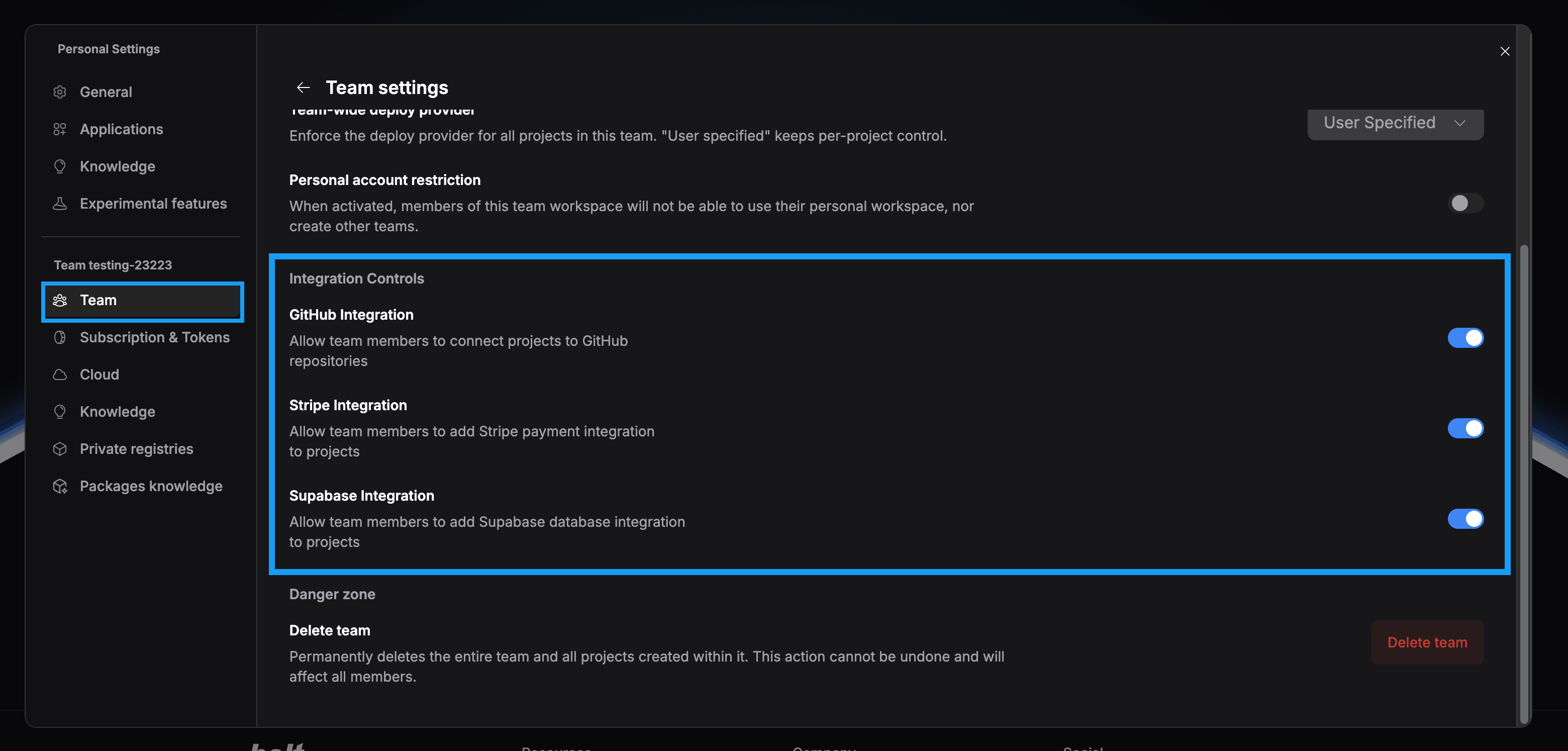
Teams admins can now manage which third-party integrations team members can use. This includes services like Netlify, Supabase, and GitHub. You can [allow or block access directly in your admin settings](/settings/team-settings#enable-or-disable-integrations).
### Restrict integrations as a Teams admin
Teams admins can now manage which third-party integrations team members can use. This includes services like Netlify, Supabase, and GitHub. You can [allow or block access directly in your admin settings](/settings/team-settings#enable-or-disable-integrations).
 ### Manually add or invite users to your project
You can add users to your project by creating a new row in the database or by sending an invitation email. For details, see [how to add new users to your project](/cloud/database/user-management#add-new-users).
### Editable email templates
Bolt now supports editing the email templates that are sent to your users. This includes sign up confirmation, user invitations, email address changes, and password reset messages.
See the Database docs to learn how to [edit your templates](/cloud/database/authentication#edit-email-templates).
### Open recent projects when working in a project
Before, projects could only be opened from the Bolt homepage. You can now click the title bar inside any project to [view your recent projects](/building/using-bolt/projects-files#working-in-a-project).
### Manually add or invite users to your project
You can add users to your project by creating a new row in the database or by sending an invitation email. For details, see [how to add new users to your project](/cloud/database/user-management#add-new-users).
### Editable email templates
Bolt now supports editing the email templates that are sent to your users. This includes sign up confirmation, user invitations, email address changes, and password reset messages.
See the Database docs to learn how to [edit your templates](/cloud/database/authentication#edit-email-templates).
### Open recent projects when working in a project
Before, projects could only be opened from the Bolt homepage. You can now click the title bar inside any project to [view your recent projects](/building/using-bolt/projects-files#working-in-a-project).
 ## Improvements
* You can now reset email templates to their default versions, and the overall interface has been updated for easier use.
* Connecting domains is now more straightforward, with clearer errors and warnings when something needs attention.
## New features
### Automatic security reviews when publishing
Bolt automatically checks for security vulnerabilities when you publish your site. Learn more about [automatic security reviews when publishing your project](/cloud/hosting/publish#review-security).
### Google (SSO) for user authentication
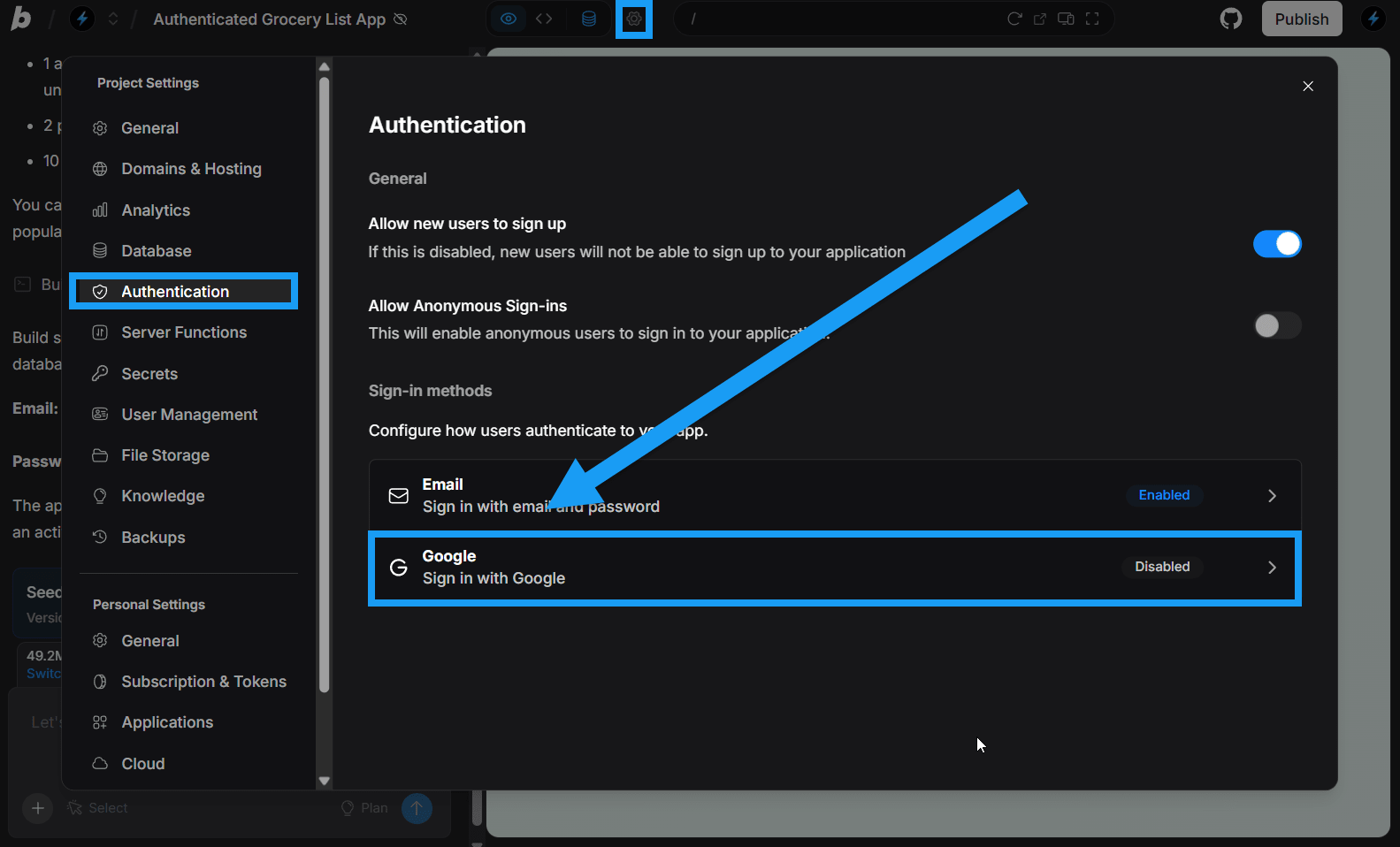
Bolt now supports Google SSO (Single Sign-On) as an authentication option. This means users can sign in to your website using their Google account instead of creating a separate email and password.
Learn more about [using Google SSO for authentication](/integrations/google-sso).
## Improvements
* You can now reset email templates to their default versions, and the overall interface has been updated for easier use.
* Connecting domains is now more straightforward, with clearer errors and warnings when something needs attention.
## New features
### Automatic security reviews when publishing
Bolt automatically checks for security vulnerabilities when you publish your site. Learn more about [automatic security reviews when publishing your project](/cloud/hosting/publish#review-security).
### Google (SSO) for user authentication
Bolt now supports Google SSO (Single Sign-On) as an authentication option. This means users can sign in to your website using their Google account instead of creating a separate email and password.
Learn more about [using Google SSO for authentication](/integrations/google-sso).
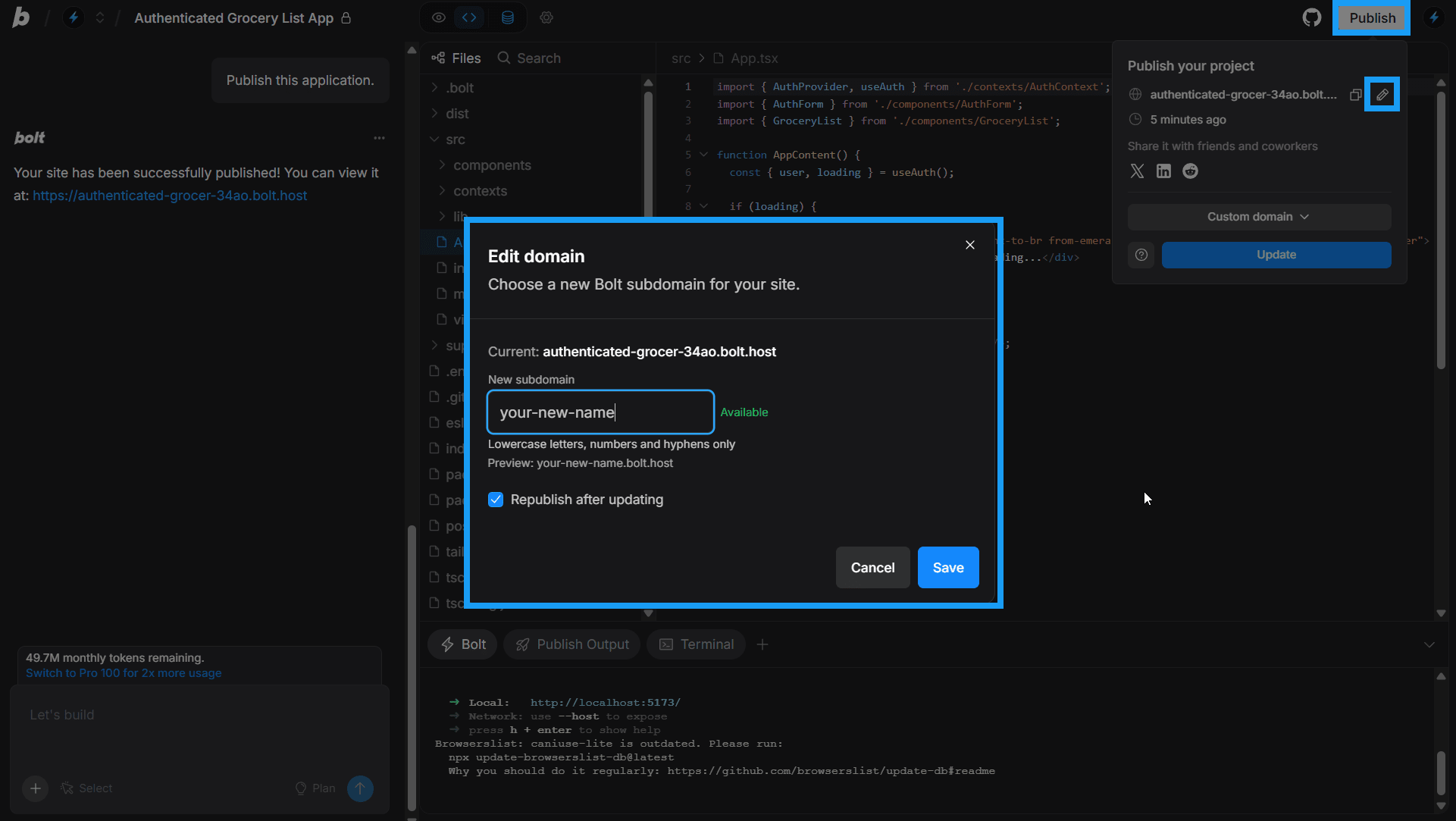
 ### Customize your Bolt hosting domain
You can now change the default `bolt.host` domain that’s created when you publish your app with Bolt hosting.
Learn how to [change your Bolt hosting URL](/cloud/hosting/publish#change-your-bolt-host-url).
### Customize your Bolt hosting domain
You can now change the default `bolt.host` domain that’s created when you publish your app with Bolt hosting.
Learn how to [change your Bolt hosting URL](/cloud/hosting/publish#change-your-bolt-host-url).
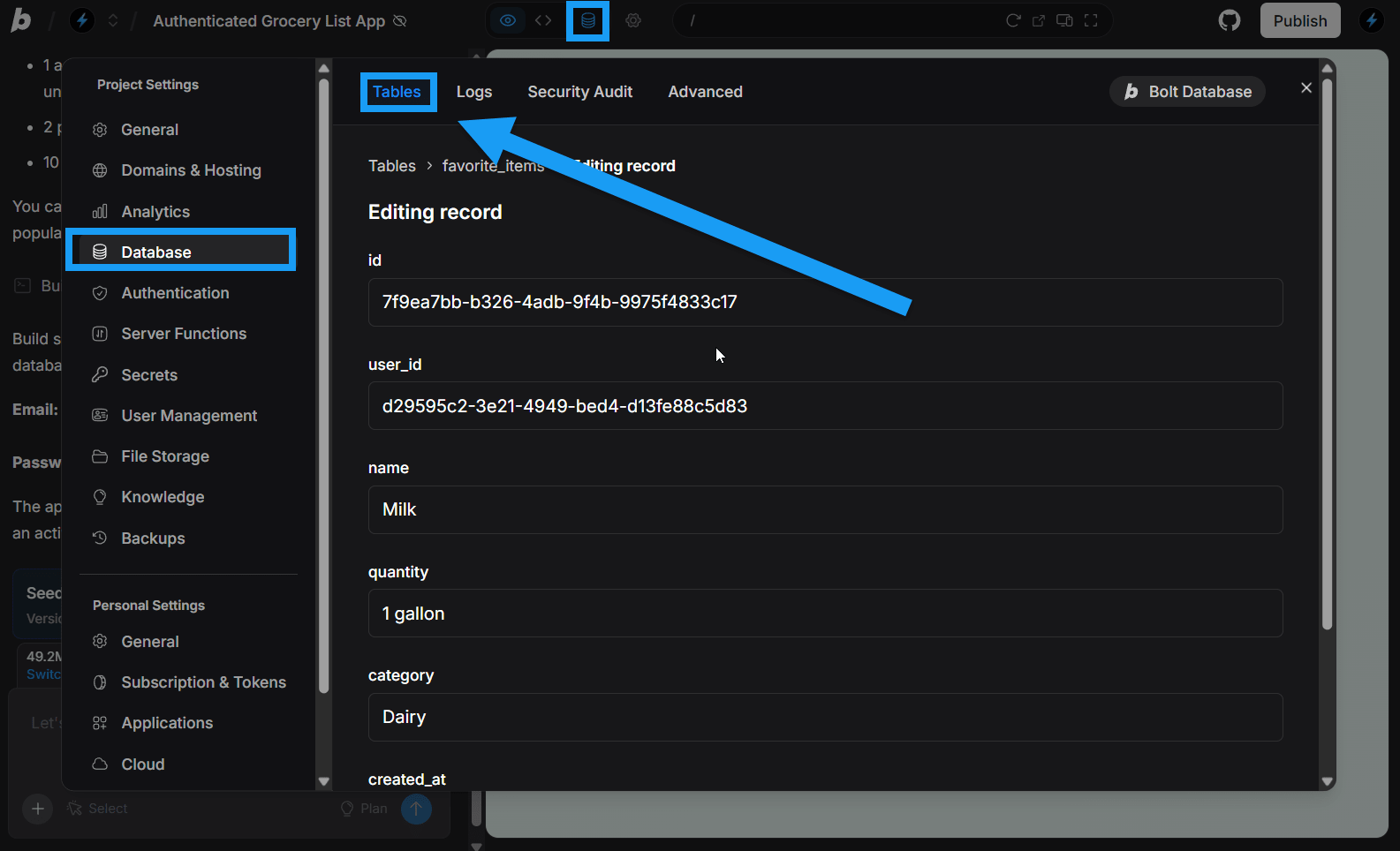
 ### Manually edit Bolt database rows
You can now manually manage database table rows directly in the **Tables** tab within your Database Settings.
Learn more about [Viewing and editing your databases](/cloud/database/tables).
### Manually edit Bolt database rows
You can now manually manage database table rows directly in the **Tables** tab within your Database Settings.
Learn more about [Viewing and editing your databases](/cloud/database/tables).
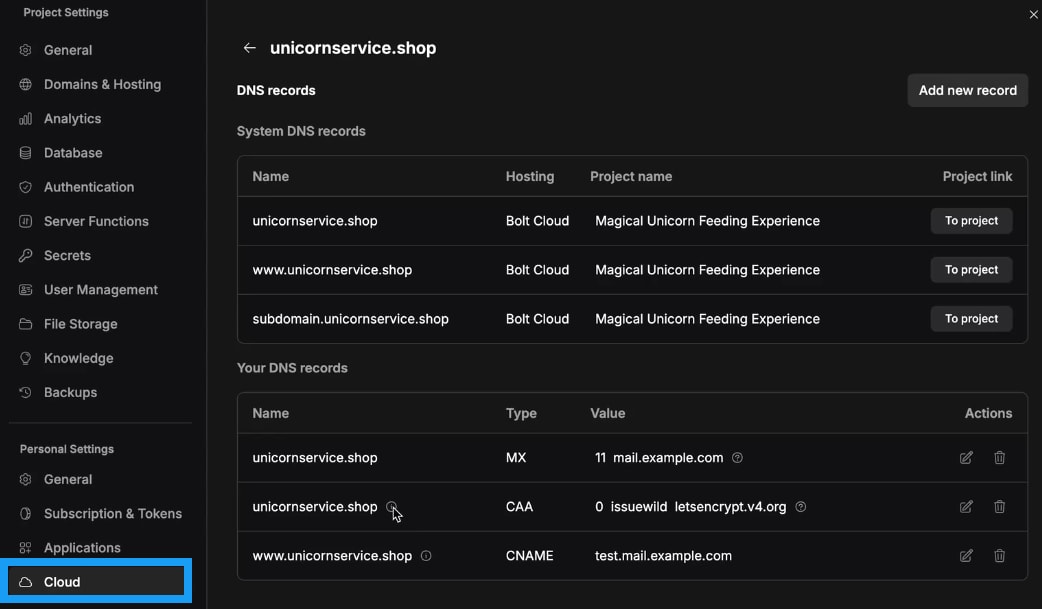
 ### DNS records management
Bolt now gives you the ability to add, edit, or delete your own custom DNS records for domains purchased through Bolt.
Learn more about [DNS records](/cloud/domains/dns-records).
### DNS records management
Bolt now gives you the ability to add, edit, or delete your own custom DNS records for domains purchased through Bolt.
Learn more about [DNS records](/cloud/domains/dns-records).
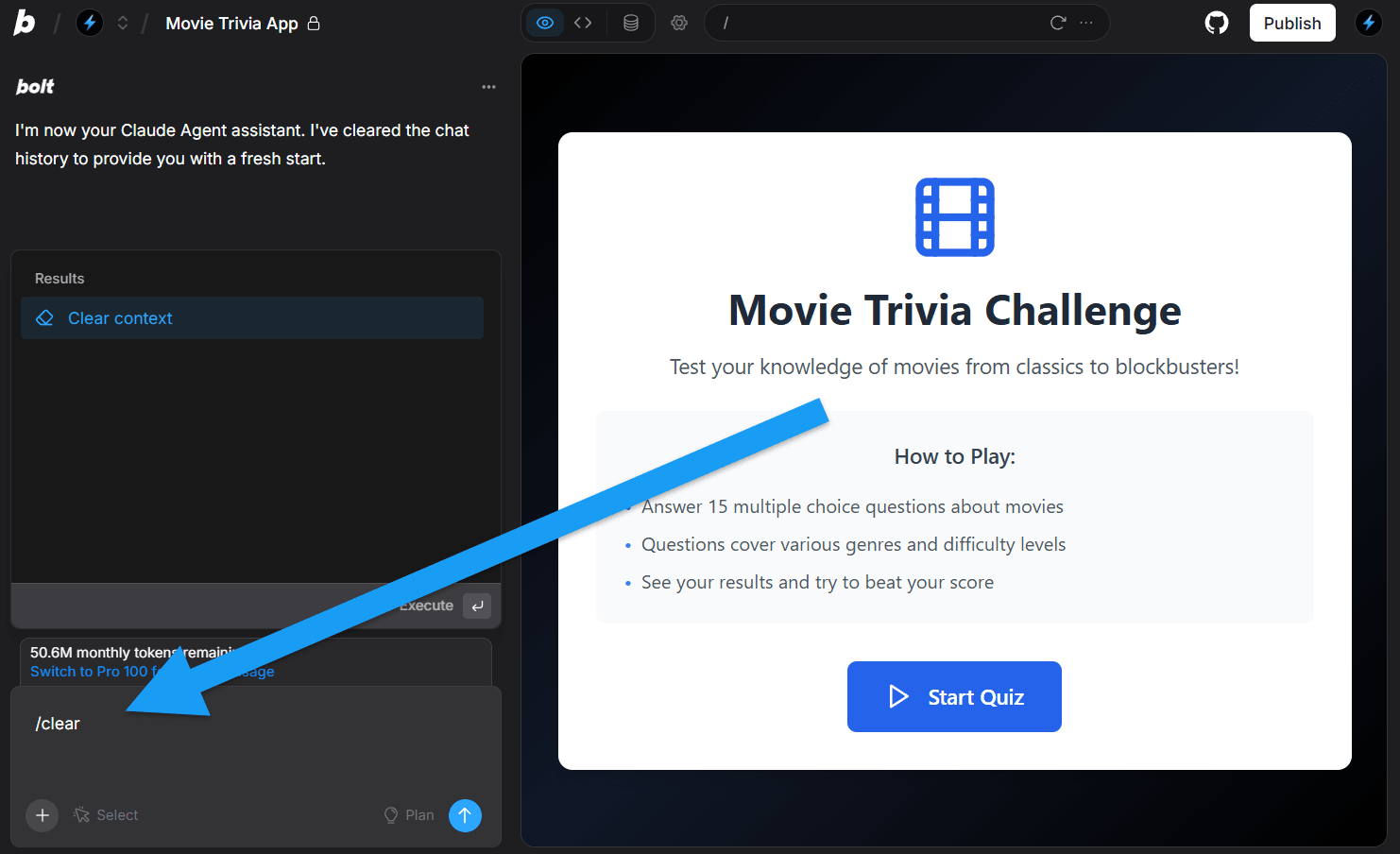
 ### Clear context
In your project chatbox, you can now clear Bolt's context by entering the `/clear` command. [Clearing context](/building/using-bolt/interacting-ai#clear-context) resets Bolt’s understanding of your project and removes unnecessary information, or “noise,” that might otherwise confuse Bolt.
### Clear context
In your project chatbox, you can now clear Bolt's context by entering the `/clear` command. [Clearing context](/building/using-bolt/interacting-ai#clear-context) resets Bolt’s understanding of your project and removes unnecessary information, or “noise,” that might otherwise confuse Bolt.
 ### Connect to a new or existing Supabase database
If you already have a Supabase database you want to use in your Bolt project, or want to create a new one, you can now [connect it through your Database settings](/integrations/supabase#connect-a-supabase-database).
### Connect to a new or existing Supabase database
If you already have a Supabase database you want to use in your Bolt project, or want to create a new one, you can now [connect it through your Database settings](/integrations/supabase#connect-a-supabase-database).
 ## Improvements
* Added support for user-created A and AAAA [DNS records](/cloud/domains/dns-records).
* When Claude Agent sets up a database, you’ll now see a clear success confirmation message.
* Improved the flow for adding a custom domain or subdomain with clearer notifications.
* Team admins can now [set a default deploy provider](/settings/team-settings#set-the-default-publishing-provider) for all team projects.
* You can now clone Bolt databases when you duplicate a project. The cloned database includes the schema but not the data. To learn more, see [Database duplication](/building/using-bolt/projects-files#database-duplication).
* Bolt can now view plain text files, such as CSV and TXT files.
* We've removed the "Delete chat history" buttons from Project and Personal Settings to avoid confusion. You can still easily [delete projects](/building/using-bolt/projects-files#delete-a-project).
* You can now view all Bolt Cloud usage limits in one place and [increase your hosting limits](/cloud/hosting/plans#increase-hosting-limits) in your Cloud settings.
## New features - Bolt V2
### Claude Agent
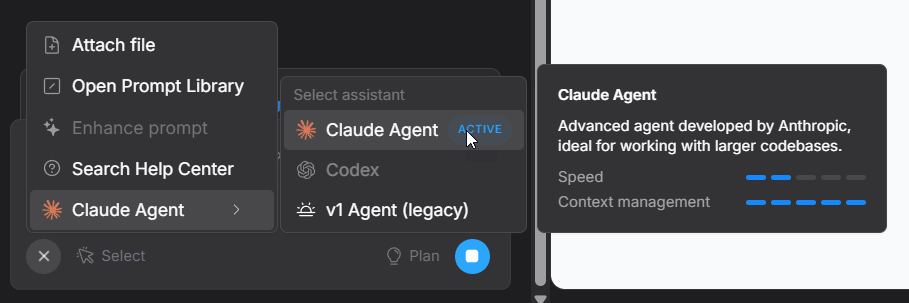
Claude Agent is now the default [large language model (LLM)](/building/intro-llms) powering Bolt. While the v1 Agent (legacy) remains available, Claude Agent delivers major upgrades in performance and fewer errors, making it the better choice for most users.
Learn more about [Agents](/building/using-bolt/agents), including Claude Agent.
## Improvements
* Added support for user-created A and AAAA [DNS records](/cloud/domains/dns-records).
* When Claude Agent sets up a database, you’ll now see a clear success confirmation message.
* Improved the flow for adding a custom domain or subdomain with clearer notifications.
* Team admins can now [set a default deploy provider](/settings/team-settings#set-the-default-publishing-provider) for all team projects.
* You can now clone Bolt databases when you duplicate a project. The cloned database includes the schema but not the data. To learn more, see [Database duplication](/building/using-bolt/projects-files#database-duplication).
* Bolt can now view plain text files, such as CSV and TXT files.
* We've removed the "Delete chat history" buttons from Project and Personal Settings to avoid confusion. You can still easily [delete projects](/building/using-bolt/projects-files#delete-a-project).
* You can now view all Bolt Cloud usage limits in one place and [increase your hosting limits](/cloud/hosting/plans#increase-hosting-limits) in your Cloud settings.
## New features - Bolt V2
### Claude Agent
Claude Agent is now the default [large language model (LLM)](/building/intro-llms) powering Bolt. While the v1 Agent (legacy) remains available, Claude Agent delivers major upgrades in performance and fewer errors, making it the better choice for most users.
Learn more about [Agents](/building/using-bolt/agents), including Claude Agent.
 ### Bolt Database
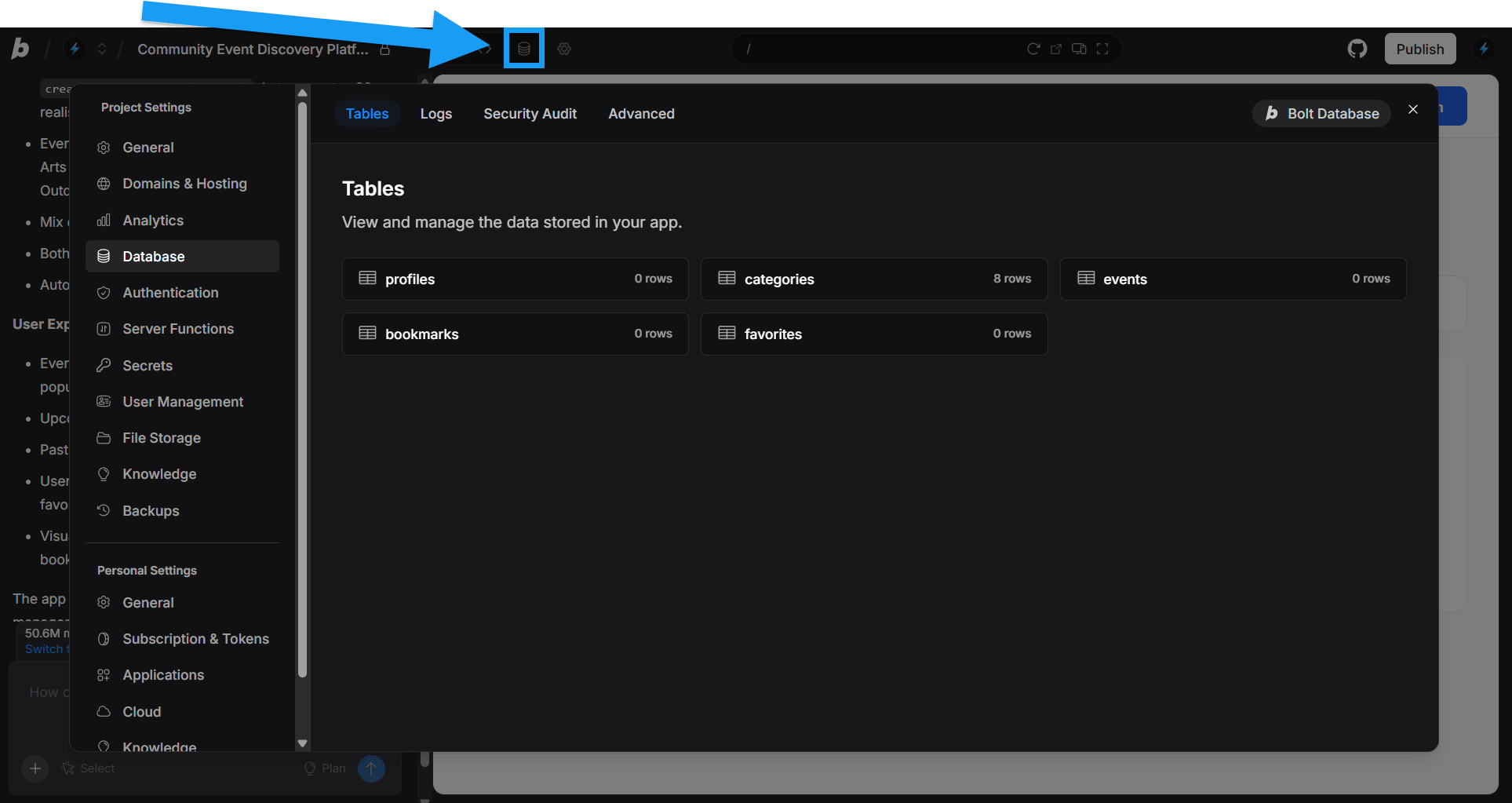
Bolt Database joins Bolt Hosting and Domains to make app development even simpler. Every project now includes unlimited built-in databases that are created automatically when needed. [Supabase integration](/integrations/supabase) is still supported for added flexibility.
Bolt Database includes features such as authentication, server (edge) functions, secrets, user management, and file storage.
Learn more about [Bolt Database](/cloud/database).
### Bolt Database
Bolt Database joins Bolt Hosting and Domains to make app development even simpler. Every project now includes unlimited built-in databases that are created automatically when needed. [Supabase integration](/integrations/supabase) is still supported for added flexibility.
Bolt Database includes features such as authentication, server (edge) functions, secrets, user management, and file storage.
Learn more about [Bolt Database](/cloud/database).
 ### Analytics
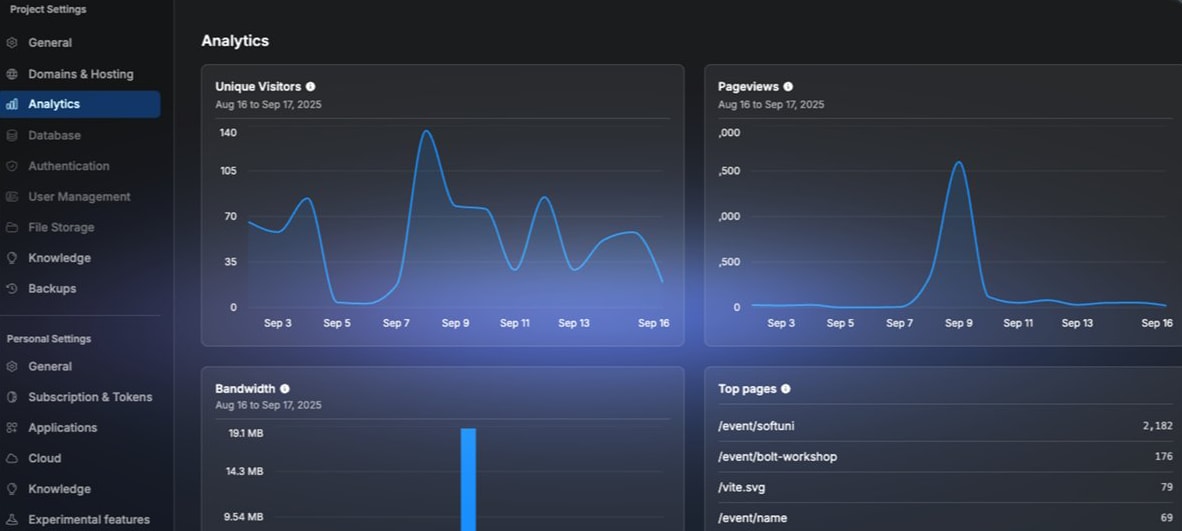
You can now access web analytics for your published project right from the Project Settings menu. View details like unique visitors, page views, top pages, bandwidth usage, and more. Learn more about [Analytics](/cloud/hosting/analytics).
### Analytics
You can now access web analytics for your published project right from the Project Settings menu. View details like unique visitors, page views, top pages, bandwidth usage, and more. Learn more about [Analytics](/cloud/hosting/analytics).
 ## Improvements
* You'll now hear a notification chime when Bolt completes a task.
* We've implemented a new billing upgrade system that offers pro-rated upgrades with immediate token access. Learn more about [upgrading Bolt](/account-and-subscription/billing#upgrade-your-paid-plan-to-a-higher-paid-plan).
* You can now view your database's row-level security (RLS) policies at a glance.
## New features
### Bolt Cloud — Domains and Hosting
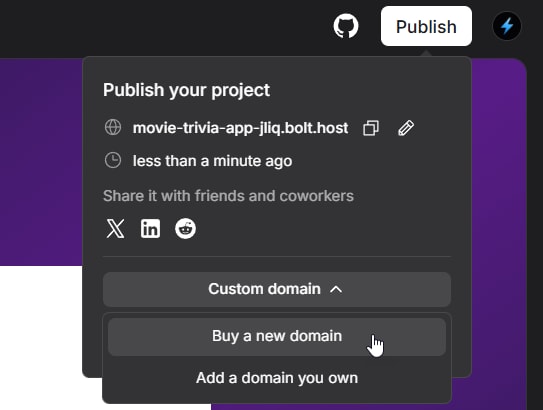
[Bolt Cloud](/cloud/bolt-cloud) has arrived with the introduction of Bolt Hosting and Domains. Instead of managing separate services for hosting and domains, you can handle everything in one place inside Bolt. This keeps your workflow simple, allowing you to focus on building your product rather than setting up cloud infrastructure.
Publish in seconds to a custom `bolt.host` domain, or purchase or connect your own custom domain.
Learn more about [Bolt Hosting](/cloud/hosting) or [Bolt Domains](/cloud/domains).
## Improvements
* You'll now hear a notification chime when Bolt completes a task.
* We've implemented a new billing upgrade system that offers pro-rated upgrades with immediate token access. Learn more about [upgrading Bolt](/account-and-subscription/billing#upgrade-your-paid-plan-to-a-higher-paid-plan).
* You can now view your database's row-level security (RLS) policies at a glance.
## New features
### Bolt Cloud — Domains and Hosting
[Bolt Cloud](/cloud/bolt-cloud) has arrived with the introduction of Bolt Hosting and Domains. Instead of managing separate services for hosting and domains, you can handle everything in one place inside Bolt. This keeps your workflow simple, allowing you to focus on building your product rather than setting up cloud infrastructure.
Publish in seconds to a custom `bolt.host` domain, or purchase or connect your own custom domain.
Learn more about [Bolt Hosting](/cloud/hosting) or [Bolt Domains](/cloud/domains).
 ### Version History
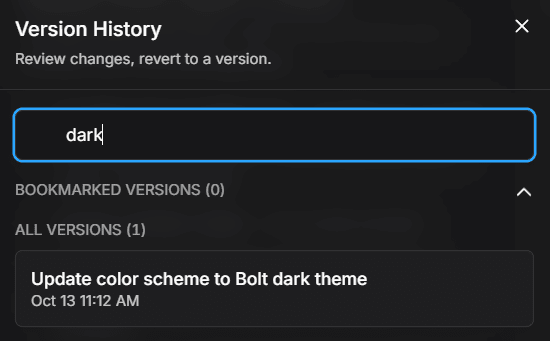
Bolt's new visual [Version History](/building/using-bolt/rollback-backup#restore-using-version-history) feature allows you to quickly and easily browse previous versions of your project, preview them, then restore them with a click.
### Version History
Bolt's new visual [Version History](/building/using-bolt/rollback-backup#restore-using-version-history) feature allows you to quickly and easily browse previous versions of your project, preview them, then restore them with a click.
 ### Project Settings
You can now quickly access your [Project Settings](/settings/project-settings) by clicking the cog wheel icon at the top of your screen. From there, you'll be able to change your knowledge, domain, and hosting settings, as well as your general settings.
### Project Settings
You can now quickly access your [Project Settings](/settings/project-settings) by clicking the cog wheel icon at the top of your screen. From there, you'll be able to change your knowledge, domain, and hosting settings, as well as your general settings.
 ## Improvements
* Bolt now lazy loads previous messages to improve performance.
* Free tier users will see a “Made in Bolt” badge on their projects. Upgrading to any paid plan removes this badge.
* You can now unpublish projects at any time to make them private.
* Users on the highest-tier plan can now purchase token reloads.
* The Bolt Help Center is now accessible directly from the chatbox by clicking the question mark icon.
## New features
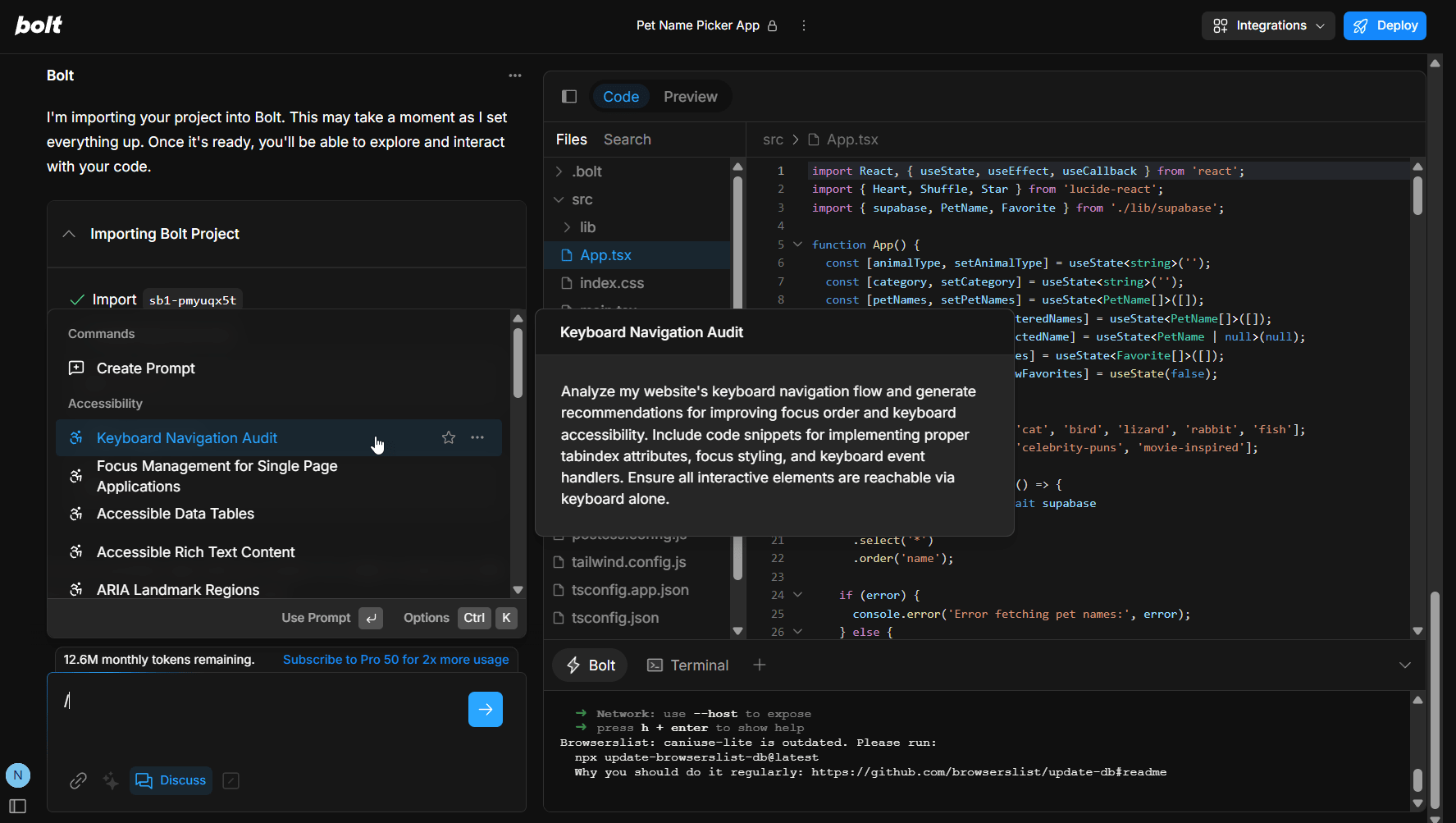
### Prompt Library
To help you save time and improve the quality of your prompts, your chatbox now includes a Prompt Library feature with popular prompts and the ability to save your own. Learn more about the [Prompt Library](/building/using-bolt/interacting-ai#prompt-library).
## Improvements
* Bolt now lazy loads previous messages to improve performance.
* Free tier users will see a “Made in Bolt” badge on their projects. Upgrading to any paid plan removes this badge.
* You can now unpublish projects at any time to make them private.
* Users on the highest-tier plan can now purchase token reloads.
* The Bolt Help Center is now accessible directly from the chatbox by clicking the question mark icon.
## New features
### Prompt Library
To help you save time and improve the quality of your prompts, your chatbox now includes a Prompt Library feature with popular prompts and the ability to save your own. Learn more about the [Prompt Library](/building/using-bolt/interacting-ai#prompt-library).
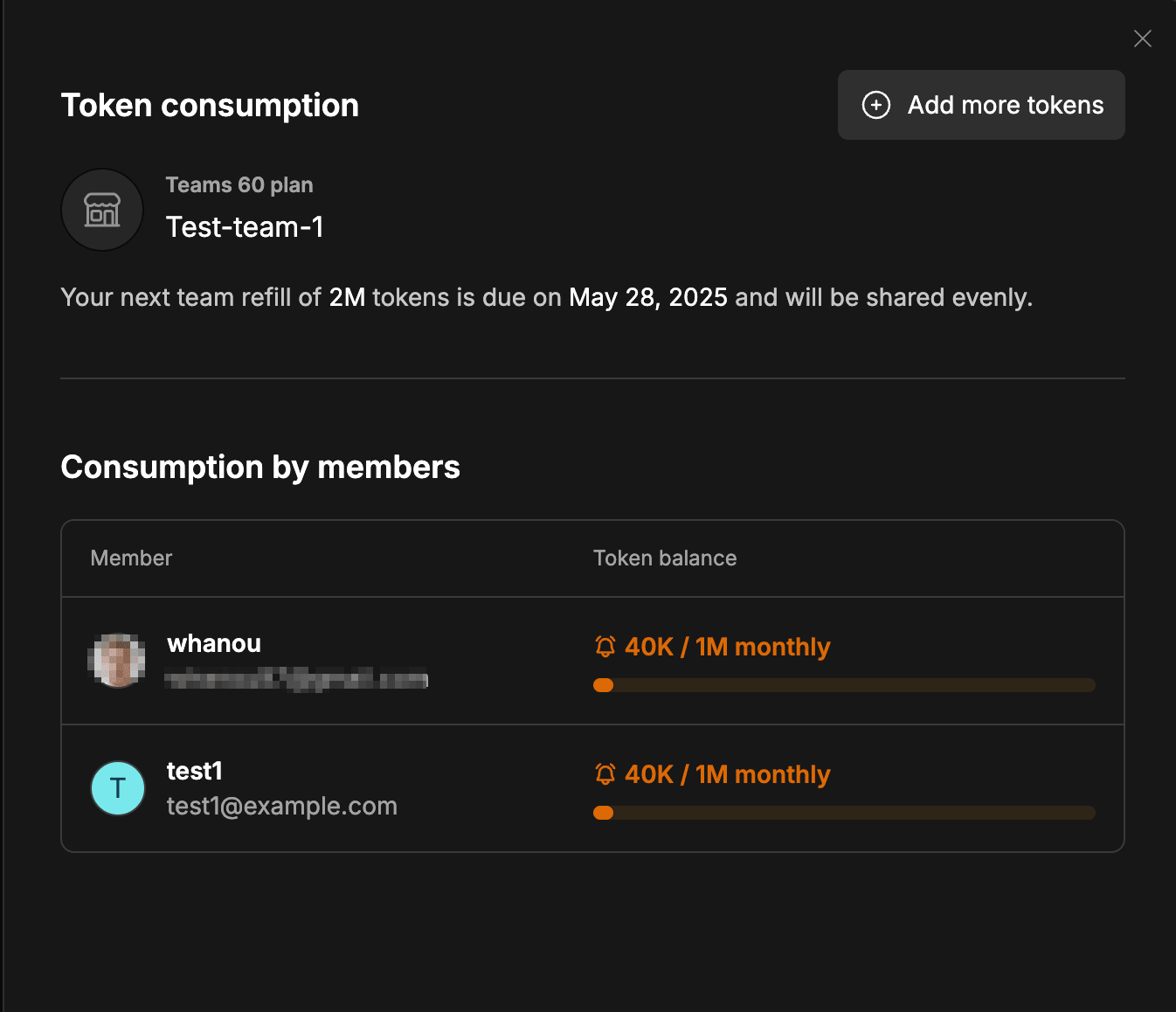
 ### View token consumption for teams
As a Teams admin, you can now view a table that lists your team members along with the number of tokens allocated to each person and the number they’ve used.
### View token consumption for teams
As a Teams admin, you can now view a table that lists your team members along with the number of tokens allocated to each person and the number they’ve used.
 ## Improvements
* We’ve released a dedicated [Pricing page](https://bolt.new/pricing), making it easier to browse and understand available plans.
* Subscription management, including for Teams, has moved from StackBlitz into Bolt, making it quicker and easier to manage both personal and team plans. You can now upgrade your subscription by clicking Subscriptions & Tokens in the menu that appears when you hover over the left side of the screen. See [Billing](/account-and-subscription/billing) to learn more.
* We’ve renamed the Deploy button to Publish. Clicking it now provides better visibility into your publishing status, including a link to your site, the last published time, and any unpublished changes.
* Bolt now uses the Sonnet 4 model permanently, offering a larger context window for better performance and support for more complex projects.
* You can now preview images by clicking them in Code View.
* We’ve revamped the Settings menu to make navigation more intuitive.
* You can now view a visualization of your token usage and balance by selecting Subscriptions & Tokens.
* We’ve added Package Knowledge and NPM registries to expand technical functionality.
## New features
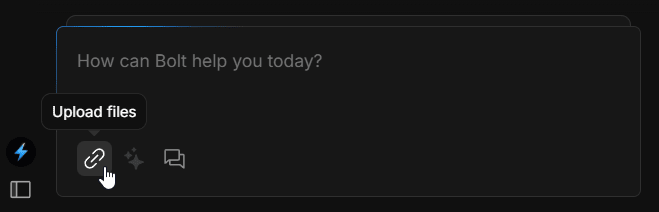
### Upload files
Adding files to your project is now easier with the new Upload file feature in your chatbox. Drag and drop your file over the chatbox, or click the file icon to browse your local machine for a file to upload.
## Improvements
* We’ve released a dedicated [Pricing page](https://bolt.new/pricing), making it easier to browse and understand available plans.
* Subscription management, including for Teams, has moved from StackBlitz into Bolt, making it quicker and easier to manage both personal and team plans. You can now upgrade your subscription by clicking Subscriptions & Tokens in the menu that appears when you hover over the left side of the screen. See [Billing](/account-and-subscription/billing) to learn more.
* We’ve renamed the Deploy button to Publish. Clicking it now provides better visibility into your publishing status, including a link to your site, the last published time, and any unpublished changes.
* Bolt now uses the Sonnet 4 model permanently, offering a larger context window for better performance and support for more complex projects.
* You can now preview images by clicking them in Code View.
* We’ve revamped the Settings menu to make navigation more intuitive.
* You can now view a visualization of your token usage and balance by selecting Subscriptions & Tokens.
* We’ve added Package Knowledge and NPM registries to expand technical functionality.
## New features
### Upload files
Adding files to your project is now easier with the new Upload file feature in your chatbox. Drag and drop your file over the chatbox, or click the file icon to browse your local machine for a file to upload.
 ## Improvements
* You can now connect a GitHub repository to Bolt by entering its URL when using the [Import an existing GitHub repository](/integrations/git#import-an-existing-repository) feature.
* Bolt now autofixes errors for you, saving you time and frustration. You can see the autofixed errors tracked as separate error types in your chat history.
* You can now see the `.bolt` folder in Code View, allowing you to directly edit the `.bolt/ignore` file. See [Using the .bolt/ignore file](/troubleshooting/issues#use-the-bolt%2Fignore-file) to learn more.
* If you open Bolt in a non-Chromium browser, you'll now see a warning reminding you that Bolt works best in Chromium-based browsers such as Chrome, Edge, Opera, or Brave.
## Improvements
* You can now connect a GitHub repository to Bolt by entering its URL when using the [Import an existing GitHub repository](/integrations/git#import-an-existing-repository) feature.
* Bolt now autofixes errors for you, saving you time and frustration. You can see the autofixed errors tracked as separate error types in your chat history.
* You can now see the `.bolt` folder in Code View, allowing you to directly edit the `.bolt/ignore` file. See [Using the .bolt/ignore file](/troubleshooting/issues#use-the-bolt%2Fignore-file) to learn more.
* If you open Bolt in a non-Chromium browser, you'll now see a warning reminding you that Bolt works best in Chromium-based browsers such as Chrome, Edge, Opera, or Brave.